
Fill out W-9 Form Online in 2026
Follow easy steps to provide the information you need without confusion.
Get Form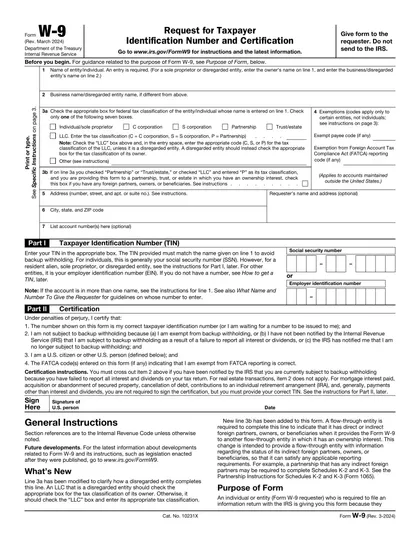
This site is not affiliated with any government, tax, or other official agency. Form last updated: 07/2026. Please verify you are using the current, correct version for your situation before submitting it.
How it works
1. Open the form
Access the pre-loaded form directly in our PDF editor. No need to upload anything!
2. Fill in your details
Carefully complete all required fields to ensure accuracy and validity.
3. Download as PDF
Save your filled-out form in PDF format, ready for submission or other needs.
What is a W-9 form?
The IRS W-9 Form, formally titled “Request for Taxpayer Identification Number and Certification,” is essential for anyone who works as a freelancer, independent contractor, or any entity receiving payments for services. It's used to provide your Taxpayer Identification Number (TIN) to entities who pay you, ensuring the correct reporting of taxes to the IRS. This form helps manage your tax obligations efficiently, avoiding potential issues with tax withholdings and reporting.
What is a W-9 form used for?
Filling out a W-9 Form is essential for accurate tax documentation. Here's what it's used for:
- To provide your taxpayer identification number to entities that pay you.
- To certify your tax status as a U.S. person.
- To claim exemption from backup withholding if applicable.
What information is required on a W-9 Form?
- Legal Name: Your full name or entity name as it appears on your federal tax return.
- Business Name (DBA): The secondary name you operate under, if it differs from your legal name.
- Federal Tax Classification: Defines your entity's legal structure for tax purposes (e.g., Individual, Corporation, Partnership, or LLC type).
- Exemption Codes (if applicable): Codes used by specific, exempt entities to declare freedom from backup withholding or FATCA reporting requirements.
- Address: Your complete mailing address where the payer will send tax information forms (like 1099s).
- Taxpayer Identification Number (TIN): Your unique IRS identifier; either your Social Security Number (SSN) or Employer Identification Number (EIN).
- Certification and Signature: Your legal confirmation that all the information (especially the TIN and U.S. person status) is correct under penalty of perjury.
How to fill out a W-9 Form
Open the form in our PDF editor Click “Get Form” to load an electronic W-9 Form and start entering your details.
Complete your information (Lines 1–6)
Line 1: Enter your legal name as it appears on your tax return. Line 2: Add your business name, if you use one. Line 3: Choose your tax classification (for example, Individual/Sole Proprietor, LLC, Corporation). Lines 5–6: Provide your mailing address.Add your Taxpayer Identification Number (Part I) Enter your SSN if you’re filing as an individual, or your EIN if you’re completing the form for a business.
Sign the form (Part II) Use our electronic signature tool to sign and date the certification section.
Download your W-9 Click Done to save and download your printable W-9 Form.
Who is required to fill out a W-9 Form?
Form W-9 is primarily filled out by freelancers, independent contractors, and vendors to provide their Taxpayer Identification Number (TIN) to entities that pay them.
Businesses and financial institutions use the completed Form W-9 to report income paid to contractors and to manage tax reporting to the IRS.
When is a W-9 not required?
Certain individuals may not need to complete a W-9 Form. For example, those who are not engaged in an employment relationship or independent contractor work within the United States might not require filling out this form.
Additionally, non-residents performing work outside the U.S. typically do not need to submit a W-9. It's designed primarily for U.S. persons, including citizens and residents, to provide their taxpayer identification numbers to entities that pay them.
When is a W-9 Form due?
The deadline for submitting a W-9 Form is typically upon request by the individual or entity that requires your tax information for reporting purposes. There's not a specific due date, but it's important to provide it promptly when asked.
Submitting your W-9 Form in a timely manner ensures compliance with tax reporting requirements and helps avoid potential delays or issues with payments.
Where can I get a blank W-9 Form?
If you need to complete a W-9 Form, CookPDF offers an IRS-issued digital W-9 template right in our editor. The blank form is preloaded and editable, so you can start entering your information right away without downloading it from another site.
Using an online W-9 Form helps you complete it more quickly because you don’t need to print, scan, or upload anything to start working. Keep in mind that CookPDF helps you fill out and save the form, but you’ll still need to submit it on your own.
How to sign a W-9 Form online
To sign a W-9 Form online with CookPDF, start by filling out the necessary fields. Once finished, look for the Sign tool.
Please note that CookPDF lets you create simple electronic signatures. Follow the steps on the screen to place your signature on the form, then download your finished copy.
Where to file a W-9 Form?
To submit a W-9, send it directly to the requester. It is not sent to the IRS. Make sure all details on the form are accurate before mailing it to avoid any potential issues with payment or reporting.
Frequently asked questions
Fill out W-9 Form Online in 2026
Download Form