
This site is not affiliated with any government, tax, or other official agency. Form last updated: 07/2026. Please verify you are using the current, correct version for your situation before submitting it.
How it works
1. Open the form
Access the pre-loaded form directly in our PDF editor. No need to upload anything!
2. Fill in your details
Carefully complete all required fields to ensure accuracy and validity.
3. Download as PDF
Save your filled-out form in PDF format, ready for submission or other needs.
What is a 1040-SR form?
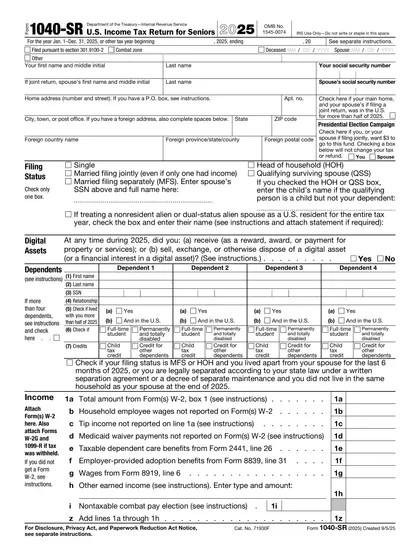
The form 1040-SR is designed for seniors, specifically those aged 65 and older. It provides a simpler and more readable way for them to submit their taxes. Form 1040-SR includes the same tax calculation features as the standard form 1040 but with a larger font and a clearer layout, making it more accessible for older taxpayers. This form allows seniors to report their income, including social security benefits, and to calculate their tax liability or refund due, ensuring they meet their tax obligations accurately.
What is a 1040-SR form used for?
Form 1040-SR is designed for senior taxpayers who need a simpler way to manage their taxes. Here’s what it’s used for:
- To report income from various sources.
- To claim any tax credits available to seniors.
- To calculate the tax amount due or refundable.
How to fill out a 1040-SR form?
Select the 1040-SR form within the editor.
Fill in your personal information, including your name, address, and Social Security number.
Report your income accurately, including Social Security benefits and any distributions from IRAs or pensions.
Claim any deductions or credits applicable to you, such as the standard deduction.
Review your tax liability and calculate the tax owed or refund due.
Create an electronic signature to validate the form.
Download the completed form and submit it to the IRS via mail or IRS e-file services.
Who is required to fill out a 1040-SR form?
Form 1040-SR is intended for seniors, specifically taxpayers aged 65 or older, designed to make tax filing simpler for them.
After submission, the IRS uses the form to assess and process seniors' taxes, ensuring the correct tax obligations are met.
When is a 1040-SR form not required?
Not everyone needs to fill out the Form 1040-SR. This form is designed for seniors, specifically taxpayers who are 65 years of age or older.
If you are younger than 65, you would not use this form. Instead, you would likely use the standard Form 1040 for your tax return.
When is a 1040-SR form due?
The deadline for the Form 1040-SR is April 15th of each year. If April 15th falls on a weekend or a legal holiday, the due date is shifted to the next business day.
This form is used by seniors, allowing them to report their income and calculate federal taxes owed or refunds due. Meeting this deadline is crucial to avoid any potential penalties or interest on taxes owed.
How to get a blank 1040-SR form?
To get a blank form 1040-SR, visit our platform where the template is pre-loaded into our editor. This allows you to start filling it out right away without the need to download it from anywhere else. Remember, our website assists in filling out and downloading the form, but not in filing it.
How to sign 1040-SR form online?
To sign form 1040-SR online, start by visiting CookPDF. Open it in our editor and fill in the necessary information using available tools.
After completing the form, you can create a simple electronic signature. Click 'Done' to download your signed form for your records.
Where to file a 1040-SR?
Form 1040-SR can be submitted online through IRS-approved platforms. It's designed for seniors.
Alternatively, it can also be sent by mail to the IRS, following official instructions.
Frequently asked questions
Fill out 1040-SR Form Online in 2026
Download Form