
This site is not affiliated with any government, tax, or other official agency. Form last updated: 07/2026. Please verify you are using the current, correct version for your situation before submitting it.
How it works
1. Open the form
Access the pre-loaded form directly in our PDF editor. No need to upload anything!
2. Fill in your details
Carefully complete all required fields to ensure accuracy and validity.
3. Download as PDF
Save your filled-out form in PDF format, ready for submission or other needs.
What is a W-7 form?
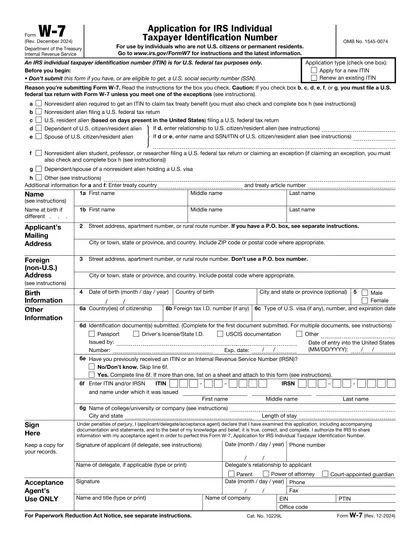
The W-7 form is essential for individuals who are not eligible for a Social Security Number but need an Individual Taxpayer Identification Number (ITIN) to comply with U.S. tax laws. This includes certain non-residents and their dependents or spouses, as well as resident aliens filing a U.S. tax return. Completing the W-7 form is a crucial step for these individuals to participate in the tax system and potentially receive a refund or fulfill tax obligations.
What is a W-7 form used for?
The IRS Form W-7 is essential for obtaining an ITIN. Here are its primary uses:
- To apply for an Individual Taxpayer Identification Number (ITIN).
- To renew an existing ITIN.
How to fill out a W-7 form?
Open the W-7 form in the editor. Start by entering your personal information, such as your name, address, and birth date.
Specify your country of citizenship and foreign tax ID number, if applicable.
Choose the reason you are applying for an ITIN from the options provided in the form.
Attach the required documents to support your application. This includes proof of identity and foreign status.
Review all the information, ensuring accuracy and completeness.
Sign and date the form in the designated area.
Save and download your completed form for your records.
Who is required to fill out a W-7 form?
Form W-7 is filled out by individuals applying for an IRS Individual Taxpayer Identification Number (ITIN) who are not eligible for a Social Security Number.
After submission, the IRS uses Form W-7 to process applications and issue ITINs, which are necessary for filing taxes and opening bank accounts.
When is a W-7 form not required?
Not everyone needs to complete a Form W-7. This form is specifically for those seeking an Individual Taxpayer Identification Number (ITIN).
If you already have a Social Security Number (SSN) or are eligible to obtain one, you do not need to submit a Form W-7.
When is a W-7 form due?
The deadline for submitting Form W-7 is typically tied to your tax return's due date. If you're applying for an ITIN to file a tax return, the W-7 should be submitted by the tax return due date, which is usually April 15th.
Remember, if you're applying for an ITIN for other reasons, you'll need to submit Form W-7 as required by the specific circumstance prompting your application.
How to get a blank W-7 form?
At our platform, we offer an IRS-issued blank template of form W-7 ready in our editor for you to fill out. You don't need to search for the template elsewhere, making it more convenient to prepare your document directly on our website. Remember, while we help in creating and downloading the form, we don't assist in submitting it.
How to sign W-7 form online?
To sign the W-7 form online with CookPDF, first complete all required fields. Then, use the electronic signature feature to add your signature.
After adding your signature, click 'Done' to proceed with downloading your signed document. Remember, CookPDF supports electronic signatures for forms like W-7. However, be sure to check the IRS website, for the most up-to-date information on signature requirements.
Where to file a W-7?
The form W-7 can be submitted by mail to the IRS. This method is used to apply for an ITIN.
It cannot be filed online, ensuring applicants follow the mail-in instructions carefully.
Frequently asked questions
Fill out W-7 Form Online in 2026
Download Form