
This site is not affiliated with any government, tax, or other official agency. Form last updated: 07/2026. Please verify you are using the current, correct version for your situation before submitting it.
How it works
1. Open the form
Access the pre-loaded form directly in our PDF editor. No need to upload anything!
2. Fill in your details
Carefully complete all required fields to ensure accuracy and validity.
3. Download as PDF
Save your filled-out form in PDF format, ready for submission or other needs.
What is Form W-4?
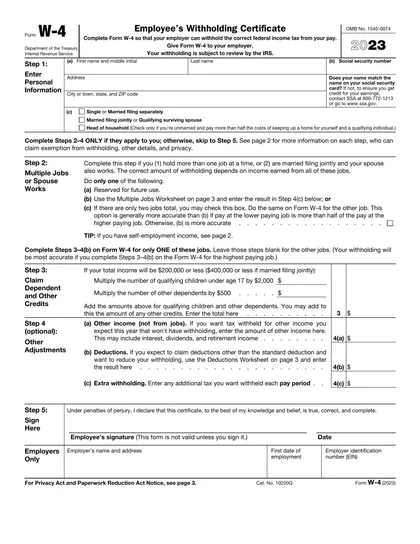
The IRS Form W-4, known as the Employee's Withholding Certificate, is essential for deciding how much federal income tax your employer will deduct from your paycheck. You'll need to complete this form when starting a new job or if you experience significant life events, such as getting married or having a child. Properly filling out the W-4 helps you avoid owing a large amount at tax time and ensures you don't pay too much throughout the year, making it crucial for accurate tax withholding and compliance.
What is the 2023 version of Form W-4 used for?
You may need to complete Form W-4 for the year 2023 for the following reasons:
- Archival purposes: For historical or compliance records.
- Former employment: If needed for past employment verification.
- Tax audit: In case of an audit related to previous years' tax returns.
- Documentation: For maintaining personal financial records from previous years.
How to fill out Form W-4?
Enter your personal information: name, address, Social Security number, and tax filing status in Step 1.
Complete Step 2 if you have multiple jobs or your spouse works to adjust withholding.
Claim dependents in Step 3 if applicable.
Use Step 4 for other adjustments like additional income or extra withholding.
Submit the completed form to your employer for correct tax withholding.
Who is required to fill out Form W-4 for 2023?
Employees who earned wages in 2022 may need to fill out the 2022 version of Form W-4 to update withholding information, clarify previous withholding based on changing circumstances, or meet employer requirements for record-keeping. New hires and those adjusting withholding should use the 2020 version or later.
When should you file Form W-4 for 2023?
The 2023 version of Form W-4 does not have a specific deadline for filing. It should be submitted to your employer as soon as possible when starting a new job or when your tax situation changes. If you need to maintain exempt status from withholding, submit a new Form W-4 by February 15 of the following year. Changes take effect in the next payroll period after your employer receives the form.
How to get a blank Form W-4 for the year 2023?
To get a blank Form W-4 for the year 2023, visit our website. The Internal Revenue Service (IRS) issues this form. Our platform automatically loads a blank version for you, so no separate download is necessary. Remember, CookPDF aids in filling and downloading but not filing forms.
How do you sign Form W-4 for 2023?
To complete your 2023 Form W-4, ensure you sign Step 5 and include the date. You can create an electronic signature by typing your name, scanning a handwritten signature, or using a stylus. Remember, while CookPDF allows you to fill out and download the form, it does not support submission. Always check for the latest updates on the IRS website to stay informed.
Where to file Form W-4 for the year 2023?
To submit your 2023 Form W-4, simply hand it directly to your employer. This form helps them calculate your federal tax withholding.
Remember, the IRS does not accept or require Form W-4 submissions. Your employer will use the information you provide to determine your tax withholdings.
Fill Out Form W-4 (2023) Online
Download Form