
This site is not affiliated with any government, tax, or other official agency. Form last updated: 07/2026. Please verify you are using the current, correct version for your situation before submitting it.
How it works
1. Open the form
Access the pre-loaded form directly in our PDF editor. No need to upload anything!
2. Fill in your details
Carefully complete all required fields to ensure accuracy and validity.
3. Download as PDF
Save your filled-out form in PDF format, ready for submission or other needs.
What is Form W-4?
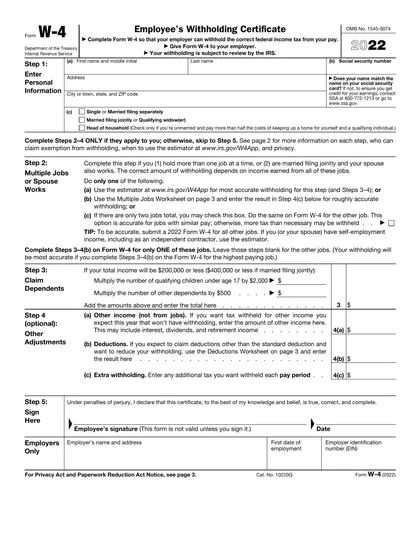
Form W-4, Employee's Withholding Certificate, allows you to inform your employer about how much federal income tax to withhold from your paychecks. Completing this form accurately helps prevent underpaying or overpaying taxes throughout the year. By ensuring the correct tax amount is withheld, you can avoid facing a large tax bill or receiving an excessive refund when filing your tax return. This form is crucial as it impacts your take-home pay and your overall tax balance with the IRS.
What is the 2022 version of Form W-4 used for?
You may need to complete Form W-4 for the year 2022 for the following reasons:
- Amendments or corrections: For adjusting previous tax withholdings.
- Reference or audits: For past tax year documentation.
- Comparative analysis: To compare previous withholding amounts.
- Historical data: To maintain records of past income and tax statuses.
How to fill out Form W-4?
Enter your personal information: full name, address, Social Security number, and tax filing status.
Complete Steps 2–4 if applicable: adjust for multiple jobs, claim dependents, report other income, deductions, or extra withholding.
Review all entries for accuracy.
Download the completed form and submit it to your employer for withholding.
Who needs to complete Form W-4 for 2022?
Individuals who missed deadlines, need to amend past tax returns, or received a late W-2 may need to complete Form W-4 for 2022. This helps correct records and avoid penalties with the IRS.
When should you file Form W-4 (2022)?
The 2022 version of Form W-4 has no specific filing deadline. It's best to submit it to your employer when starting a new job or if your personal circumstances change, like marriage or having children. Keeping your employer informed about your tax withholding status is essential for accurate deductions. If filing now for a later year, do so promptly to ensure correct withholding.
How to get a blank Form W-4 for the year 2022?
To get a blank Form W-4 for 2022, simply visit our website. The form is issued by the Internal Revenue Service (IRS), and our platform already loads a blank version for you to fill out. Remember, CookPDF aids in filling and downloading but not filing forms.
How do I sign Form W-4?
To fill out the 2022 Form W-4, ensure you include your signature for validity. You can sign with a handwritten signature or a simple electronic signature that meets E-Sign Act standards. Remember, CookPDF allows you to fill out the form and add an electronic signature, but it does not support submission. Always check for the latest updates to ensure compliance before downloading your completed form.
Where to file Form W-4 for the year 2022?
Once you've completed your 2022 Form W-4, submit it directly to your employer. They will keep it on file.
Remember, you don't send this form to the IRS. Your employer will use it to calculate your federal income tax withholding.
Fill Out Form W-4 (2022) Online
Download Form