
This site is not affiliated with any government, tax, or other official agency. Form last updated: 07/2026. Please verify you are using the current, correct version for your situation before submitting it.
How it works
1. Open the form
Access the pre-loaded form directly in our PDF editor. No need to upload anything!
2. Fill in your details
Carefully complete all required fields to ensure accuracy and validity.
3. Download as PDF
Save your filled-out form in PDF format, ready for submission or other needs.
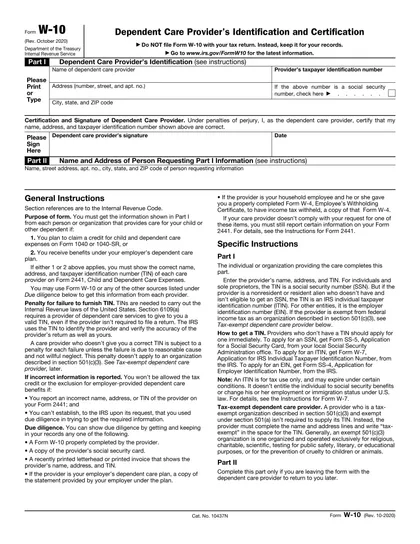
What is Form W-10?
Form W-10, Dependent Care Provider's Identification and Certification, is important for parents claiming child care tax credits. This form helps identify the care provider and confirms that they meet IRS requirements. By filling out this form, parents can ensure they receive the correct tax benefits for their dependent care expenses. It’s essential for keeping accurate records and supporting claims on your tax return. Properly completing this form can help you maximize your tax savings while following IRS guidelines.
What is Form W-10 used for?
Form W-10 is used to identify and certify dependent care providers for tax purposes:
- to provide the provider’s name and address.
- to certify the provider's Taxpayer Identification Number (TIN).
- to ensure accurate tax reporting for dependent care expenses.
How to fill out Form W-10?
Open Form W-10 in the PDF editor.
Fill in your name, address, and Social Security number in the appropriate fields.
Provide the care recipient's name and address.
Complete the certification section by signing and dating the form.
Review all entries for accuracy.
Click Done to download your completed form for submission.
Who is required to fill out Form W-10?
Parents or guardians complete Form W-10 to report care provider information for tax benefits.
Employers and the IRS use this form to verify dependent care expenses for tax credits.
When is Form W-10 not required?
Form W-10 is not needed when the care provider is a relative, such as a parent, grandparent, sibling, or other family member.
Additionally, if the care provider does not require a Taxpayer Identification Number (TIN), you can skip this form. Always check the provider's requirements to confirm whether you need to complete Form W-10.
When is Form W-10 due?
The deadline for Form W-10 is the same as when you file your tax return. This means it should be submitted by the due date of your return, which is usually April 15.
It's important to keep this form handy as it helps you report the identification and certification of your dependent care provider. Make sure all information is accurate to avoid any issues with your tax return.
How to get a blank Form W-10?
To get a blank Form W-10 Dependent Care Provider's Identification and Certification, simply visit our website. The form is pre-loaded in our editor, allowing you to fill it out directly online before downloading it for your records.
How to sign Form W-10 online?
To sign Form W-10 Dependent Care Provider's Identification and Certification using CookPDF, first, click on "Fill Form" to load the blank version of the document in the PDF editor. Fill out all required fields, including your personal information, then create a simple electronic signature within the platform.
Once you have completed the form and added your signature, click "Done" to download your signed document. Always consult official sources for specific signature requirements to ensure compliance.
Where to file Form W-10?
Form W-10 must be filled out and provided to the taxpayer. It cannot be filed online or submitted to the IRS directly.
After completing the form, the taxpayer should keep it for their records. It’s important to ensure all information is accurate before submission.
Frequently asked questions
Fill out Form W-10 Online in 2026
Download Form