
This site is not affiliated with any government, tax, or other official agency. Form last updated: 07/2026. Please verify you are using the current, correct version for your situation before submitting it.
How it works
1. Open the form
Access the pre-loaded form directly in our PDF editor. No need to upload anything!
2. Fill in your details
Carefully complete all required fields to ensure accuracy and validity.
3. Download as PDF
Save your filled-out form in PDF format, ready for submission or other needs.
What is Form IT-360.1?
Form IT-360.1, known as the Claim for Credit for Taxes Paid to Other States, helps New York taxpayers claim a credit for taxes they paid to another state. This form is important because it prevents double taxation on income earned in multiple states. By completing IT-360.1, you can reduce your tax bill in New York, ensuring you’re not overpaying. This credit is essential for anyone who worked or earned income outside of New York while being a resident.
What is Form IT-360.1 used for?
Form IT-360.1 is used by taxpayers to claim a credit for taxes paid to other states. Here’s what it’s for:
- to reduce New York State tax liability.
- to avoid double taxation on income.
- to report taxes paid to other states.
How to fill out Form IT-360.1?
Enter your personal information at the top of the form.
List the states where you paid taxes and the amounts in the appropriate sections.
Complete the calculation section to determine your credit.
Review all entries for accuracy.
Sign the form electronically.
Download the completed form for submission to the appropriate state tax agency.
Who is required to fill out Form IT-360.1?
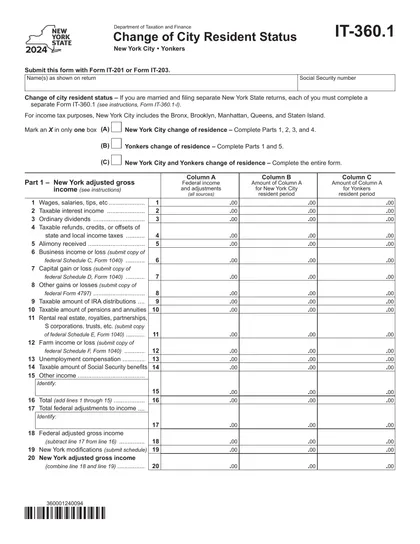
Form IT-360.1 is completed by individuals with a change in residency in New York City or Yonkers. It’s also for married couples where one spouse changed their city status.
After completion, the form is used by taxpayers to claim a credit for taxes paid to other states.
When is Form IT-360.1 not required?
Form IT-360.1 is not necessary if you were a full-year resident of New York City or Yonkers.
Additionally, if you were a full-year nonresident of these areas or did not change your residency status during the tax year, you also do not need to file this form. Always check your specific situation to ensure compliance with tax regulations.
When is Form IT-360.1 due?
The deadline for Form IT-360.1 is the same as your New York State income tax return. This means it must be filed with your Form IT-201 or Form IT-203 by the due date of your return, including any extensions you may have.
Remember, Form IT-360.1 cannot be submitted on its own. It must accompany either the Resident Income Tax Return (Form IT-201) or the Nonresident and Part-Year Resident Income Tax Return (Form IT-203).
How to get a blank Form IT-360.1?
To get a blank Form IT-360.1, simply visit our website. This form is issued by the New York State Department of Taxation and Finance, and we have a pre-loaded version ready for you to fill out.
Do you need to sign Form IT-360.1?
Form IT-360.1 does not require a signature. It's important to check for the latest updates on forms and requirements, as they can change. You can use CookPDF to fill out this form, download it, and handle any other necessary steps on your own, but remember that CookPDF does not support form submission.
Where to file Form IT-360.1?
Form 10 must be submitted to the New York State Department of Taxation and Finance.
Submission methods: mail or online.
Frequently asked questions
Fill out Form IT-360.1 Online in 2026
Download Form