
This site is not affiliated with any government, tax, or other official agency. Form last updated: 07/2026. Please verify you are using the current, correct version for your situation before submitting it.
How it works
1. Open the form
Access the pre-loaded form directly in our PDF editor. No need to upload anything!
2. Fill in your details
Carefully complete all required fields to ensure accuracy and validity.
3. Download as PDF
Save your filled-out form in PDF format, ready for submission or other needs.
What is Form 1099-G?
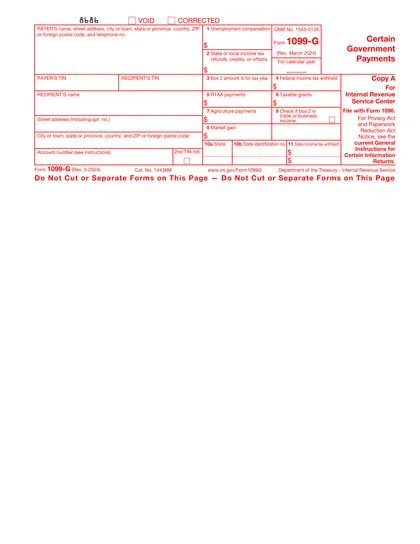
Form 1099-G is a tax document for individuals who have received government payments, like state tax refunds or unemployment benefits. It's essential for accurately reporting these amounts on your tax return. If you've received these types of payments, you'll need this form to ensure your taxes are complete and correct.
What is Form 1099-G used for?
Tax Form 1099-G is crucial for accurately reporting certain types of income. Here's what it's used for:
- To report unemployment compensation.
- To detail state or local income tax refunds.
- To list certain government payments.
How to fill out tax Form 1099-G
Form 1099-G is issued to you by a government agency — you don't fill it out yourself. Instead, use the information from the form to complete your tax return by following these steps:
Step 1: Find Box 1 (Unemployment Compensation)
Box 1 shows the total unemployment benefits you received during the year. Enter this amount on Schedule 1 (Form 1040), Line 7. This amount then flows to Line 8 of your main Form 1040.
Step 2: Review Box 2 (State/Local Income Tax Refunds)
Box 2 shows any state or local tax refund you received. Whether this is taxable depends on how you filed last year:
If you took the standard deduction last year, this refund is not taxable. Do not report it as income.
If you itemized deductions (Schedule A) last year, this refund is likely taxable. Report it on Schedule 1 (Form 1040), Line 1.
Step 3: Check Box 4 (Federal Income Tax Withheld)
Box 4 shows any federal taxes withheld from your unemployment benefits. Enter this amount on Form 1040, Line 25b. This counts as tax you already paid, which reduces what you owe or increases your refund.
Step 4: Check Box 11 (State Income Tax Withheld)
Box 11 shows any state taxes withheld. Report this amount on your state income tax return (not your federal Form 1040) to receive credit for taxes already paid to your state.
If you are a government agency issuing Form 1099-G:
- Enter your agency's name, address, and TIN in the payer section at the top left.
- Enter the recipient's TIN, name, and address in the designated fields.
- Complete the applicable boxes: Box 1 for unemployment paid, Box 2 for state/local refunds issued, and Box 3 for the tax year the refund applies to.
- File Copy A with the IRS (electronic filing is required if submitting 10 or more forms) and mail Copy B to the recipient by January 31.
Who is required to fill out Form 1099-G?
Form 1099-G is completed by government agencies to report certain payments, such as tax refunds.
Taxpayers use Form 1099-G to report these payments on their tax returns, affecting their tax obligations.
When is Form 1099-G not required?
If you did not receive any government payments such as state or local tax refunds, unemployment compensation, or certain federal payments, you might not need this form. Additionally, individuals who are not involved in specific government-related transactions or activities may not require Form 1099-G.
When is Form 1099-G due?
The deadline for submitting Form 1099-G is January 31st of the year following the year in which the payments were made.
This form is used to report certain government payments, such as state tax refunds and unemployment compensation. Meeting this deadline ensures compliance with IRS requirements and helps avoid potential penalties.
How to get a blank Form 1099-G
You do not need to fill out a blank Form 1099-G. This form is issued to you by a government agency, such as your state unemployment office or tax department. To obtain your completed Form 1099-G, visit your state's unemployment portal or tax agency website, where you can download or view your form. If you did not receive your form by early February, contact the issuing agency directly.
Do you need to sign Form 1099-G?
Form 1099-G does not typically require a signature. Users should verify with the current guidelines for any updates.
It's important to stay informed on form requirements. Checking official sources can provide the most accurate information.
Where to file Form 1099-G?
You do not file Form 1099-G separately. Instead, use the information from your 1099-G to complete your federal and state tax returns. Report the relevant amounts on Schedule 1 (Form 1040) and include any tax withheld on the appropriate lines of your return. Keep Copy B of the form with your tax records.
Frequently asked questions

Fill out Form 1099-G Online in 2026
Download Form