
Fill Out Form 1040 (2020) Online
Report your income and calculate your tax obligations accurately.
Get Form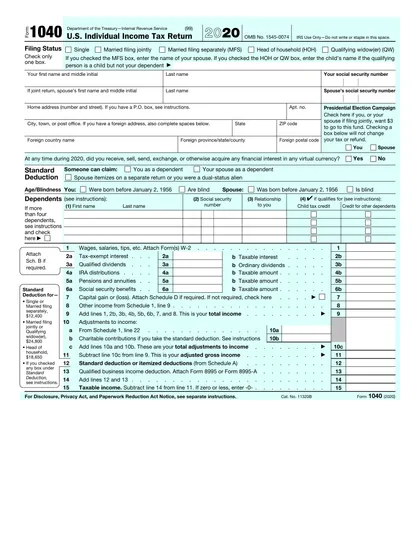
This site is not affiliated with any government, tax, or other official agency. Form last updated: 07/2026. Please verify you are using the current, correct version for your situation before submitting it.
How it works
1. Open the form
Access the pre-loaded form directly in our PDF editor. No need to upload anything!
2. Fill in your details
Carefully complete all required fields to ensure accuracy and validity.
3. Download as PDF
Save your filled-out form in PDF format, ready for submission or other needs.
What is Form 1040?
Form 1040 is the U.S. Individual Income Tax Return that Americans use to report their income and calculate federal taxes. This form is crucial for determining whether you owe taxes or will receive a refund. By filing Form 1040, you ensure that you pay the correct amount of taxes and provide the IRS with essential information needed to manage tax benefits. It plays a vital role in the tax system by helping fund government activities and ensuring compliance with tax laws.
What is the 2020 version of Form 1040 used for?
You may need to complete Form 1040 for the year 2020 if you want to:
- File a late tax return for 2020 if you missed the deadline.
- Claim a refund or tax credits related to your 2020 income or taxes paid.
- Correct or amend a previously filed 2020 return.
- Report specific taxes or credits tied to 2020.
- Provide proof of income or tax compliance for 2020 when needed.
How to fill out Form 1040?
Gather personal and financial information, including income, deductions, and credits.
Fill out the form according to IRS guidelines.
Complete relevant schedules (1, 2, 3) if necessary.
Review all entries for accuracy.
Download the completed form for your records.
Who is required to fill out Form 1040 for 2020?
Individuals who missed the 2020 tax filing deadline may need to fill out Form 1040 for that year to reduce IRS penalties, claim refunds, or resolve tax issues. Additionally, past-year forms are necessary for amended returns or audits related to 2020.
When should you file Form 1040 for the year 2020?
If you are filing your 2020 U.S. Individual Income Tax Return (Form 1040) now, the deadline was May 17, 2021. You can still file late returns or amendments within three years of this date to claim a refund or correct errors. Remember, if any deadlines fall on a weekend or holiday, the due date shifts to the next business day.
How to get a blank Form 1040 for the year 2020?
To get a blank Form 1040 for the year 2020, visit our website. The form is issued by the Internal Revenue Service (IRS), part of the U.S. Department of the Treasury. Our platform automatically loads a blank version, so no separate download is necessary. Remember, CookPDF aids in filling and downloading but not filing forms.
How do I sign Form 1040 for 2020?
When filling out Form 1040 for the 2020 tax year, remember that if you're submitting a paper return, you must provide a handwritten signature in the "Sign Here" section. For e-filing, the IRS allows a digital signature using a self-selected PIN or other approved methods. CookPDF can help you fill out the form and create a simple electronic signature, but keep in mind that this won't be valid for paper submissions. Always check for the latest updates before filing.
Where to file Form 1040 for the year 2020?
If you’re filing the 2020 Form 1040 now, you’ll need to mail it as e-filing for prior years isn’t accepted. Prepare your paper return carefully.
Make sure to check the IRS mailing address for late filings based on your state and whether you're including a payment. Follow any specific IRS instructions for submission.
Fill Out Form 1040 (2020) Online
Download Form