
This site is not affiliated with any government, tax, or other official agency. Form last updated: 07/2026. Please verify you are using the current, correct version for your situation before submitting it. This is not a substitute for the advice of a qualified attorney.
How it works
1. Open the form
Access the pre-loaded form directly in our PDF editor. No need to upload anything!
2. Fill in your details
Carefully complete all required fields to ensure accuracy and validity.
3. Download as PDF
Save your filled-out form in PDF format, ready for submission or other needs.
What is FS Form 5444?
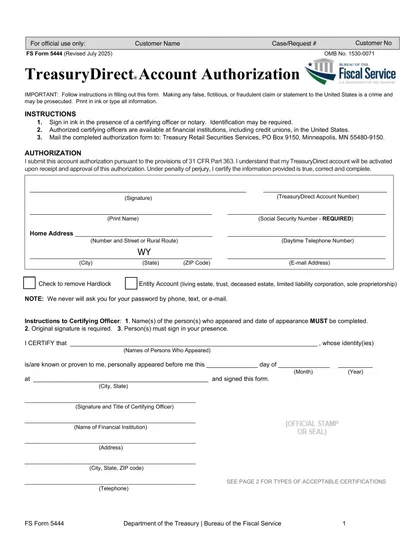
Form FS 5444, TreasuryDirect Account Authorization, is essential for individuals and entities looking to manage their TreasuryDirect accounts. This form grants authorized users the ability to perform transactions and make changes, ensuring your financial information remains secure by preventing unauthorized access. To complete this form, you must sign it in ink before a certifying officer or notary. Once signed, it should be mailed to the Treasury Retail Securities Services for processing.
What is FS Form 5444 used for?
Form FS 5444 is important for managing your TreasuryDirect account. Here’s what it does:
- Authorize Access: Permits individuals or entities to access their accounts.
- Ensure Security: Protects your account by allowing only authorized users to make changes.
- Maintain Integrity: Helps keep financial operations secure related to public debt.
- Verify Identity: Requires your identification information for verification.
- Activate Accounts: Activates your TreasuryDirect account once approved.
How to fill out Form FS 5444?
Print or type all information in ink.
Ensure the form is filled out correctly and completely.
Follow the instructions to avoid false claims.
Sign the form in ink in front of an authorized certifying officer or notary public.
Mail the completed form to Treasury Retail Securities Services.
Who is required to fill out FS Form 5444?
Individuals wishing to activate a TreasuryDirect account, including those authorizing management by a living estate, trust, deceased estate, limited liability corporation, or sole proprietorship, are responsible for completing Form FS 5444. After filling out the form, individuals use it to activate their TreasuryDirect account.
When is Form FS 5444 not required?
Form FS 5444 is not needed if you already have an active TreasuryDirect account and aren't making changes to your account authorization. You also don't need this form when resetting your password or carrying out other activities that don't relate to authorization on the TreasuryDirect system.
When is Form FS 5444 due?
FS Form 5444 does not have a fixed annual or recurring due date. Instead, you should submit FS Form 5444 as soon as you are prompted by TreasuryDirect to complete the account authorization process — for example, when opening a new account, modifying authorized signers, or managing an estate or trust account.
How to get a blank FS Form 5444?
To get a blank Form FS 5444, simply visit our website. The form is issued by the Department of the Treasury, specifically the Bureau of the Fiscal Service, and we have it pre-loaded in our editor for you to fill out. Remember, our platform aids in filling and downloading, but not filing forms.
How to sign Form FS 5444?
To sign FS Form 5444, you must sign your name in ink in the presence of a certifying officer or notary, as electronic or digital signatures are not accepted. After filling out the form using CookPDF, download it and arrange for a notary or certifying officer to witness your signature. Always check for the latest updates on the form to ensure compliance with current requirements. Remember, CookPDF facilitates form filling and downloading but does not support submission.
Where to file Form FS 5444?
To submit Form FS 5444, mail it to the address outlined in the form's instructions. Ensure all information is accurate before sending.
Remember, online submission isn’t an option for this form. Double-check your details and send it via standard mail to Treasury Retail Securities Services.
Frequently asked questions
Fill Out FS Form 5444 Online in 2026
Download Form