
This site is not affiliated with any government, tax, or other official agency. Form last updated: 07/2026. Please verify you are using the current, correct version for your situation before submitting it.
How it works
1. Open the form
Access the pre-loaded form directly in our PDF editor. No need to upload anything!
2. Fill in your details
Carefully complete all required fields to ensure accuracy and validity.
3. Download as PDF
Save your filled-out form in PDF format, ready for submission or other needs.
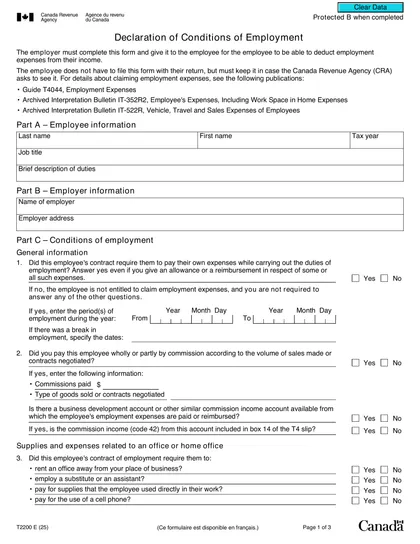
What is Form T2200?
Form T2200, the Declaration of Conditions of Employment, is an important document issued by employers to assist employees in claiming job-related expenses on their taxes. It certifies that employees incurred costs such as home office expenses, travel, and vehicle expenses while performing their duties, without receiving reimbursement from their employer. This form is essential for employees aiming to lower their income tax by verifying that these expenses are necessary and related to their job. It enables them to accurately itemize deductions on their tax return, ensuring they receive the appropriate tax credits for their work-related costs.
What is Form T2200 used for?
Form T2200 is important for employees who have job-related expenses. Here’s what it’s used for:
- Claiming Employment Expenses: Employees can claim costs like home office, mobile phone, and car expenses.
- Certifying Eligibility: Confirms that employees have incurred unreimbursed work-related expenses.
- Tax Deduction: Helps itemize deductible expenses on the personal income tax return (T777).
- Documentation: Acts as proof for CRA if they request a review.
How to fill out Form T2200?
Enter employee information: Fill in your name, address, and social insurance number.
Respond to questions about your employment conditions to clarify expense obligations.
List travel expenses and frequency of out-of-town work.
Indicate if you receive a vehicle allowance or incur motor vehicle expenses.
Confirm that only eligible expenses are included and all information is accurate.
Who is required to fill out Form T2200?
Employers are responsible for completing Form T2200, as they provide detailed information about employees' job duties and related expenses. The employer certifies the accuracy of this information, ensuring compliance with tax regulations.
Employees use Form T2200 to claim job-related expenses, which helps them support their tax deductions and potentially lower their tax obligations.
When is Form T2200 not required?
Form T2200 isn't required for employees who do not incur unreimbursed job expenses. Self-employed individuals and those whose employers cover all work-related costs also do not need it. Additionally, employees working from home voluntarily, without a contract obligation, may not require this form, although they can still claim deductions if they satisfy specific CRA criteria.
When is Form T2200 due?
Form T2200 does not have a specific filing deadline with the Canada Revenue Agency (CRA). However, employers generally provide this form to employees by the end of February each year, often together with the T4 slips. Employees should retain the form, as the CRA may request it during an audit.
How to get a blank Form T2200?
To get a blank Form T2200, which is issued by the Canada Revenue Agency (CRA), visit our website. Although the CRA provides the form, it is typically completed and certified by your employer to confirm the conditions of your employment. We offer a ready-to-fill version in our online editor for your convenience. Please note that while our platform assists with completing and downloading forms, it does not handle filing them.
How to sign Form T2200 online?
To sign Form T2200, Declaration of Conditions of Employment, you can use an electronic signature or a handwritten signature. The Canada Revenue Agency (CRA) accepts electronic signatures if applied securely, so consider using a trusted service that verifies identity and includes timestamping. After filling out the form using CookPDF, remember to download it for your records. For the latest updates on signature requirements, it's best to check the CRA’s website. CookPDF does not support submission.
Where to file Form T2200?
Form T2200, Declaration of Conditions of Employment, must be provided to the employee and is not submitted to any government body.
The employer completes the form and gives it to the employee directly, either in person or by other convenient means. Please note: the CRA (Canada Revenue Agency) does not receive a copy of this form
Frequently asked questions
Fill Out Form T2200 Online in 2026
Download Form