
Fill Out Form SU001 Online in 2026
Complete your employment separation details online in 2026
Get Form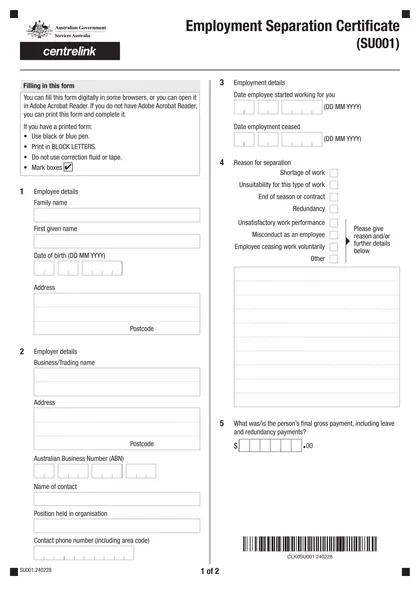
This site is not affiliated with any government, tax, or other official agency. Form last updated: 07/2026. Please verify you are using the current, correct version for your situation before submitting it.
How it works
1. Open the form
Access the pre-loaded form directly in our PDF editor. No need to upload anything!
2. Fill in your details
Carefully complete all required fields to ensure accuracy and validity.
3. Download as PDF
Save your filled-out form in PDF format, ready for submission or other needs.
What is Form SU001?
The Employment Separation Certificate (SU001) is an official document from the Australian Government that outlines key details about an employee's work history. This includes information such as the payment period, final pay, reason for termination, and earnings at the time of leaving. It's essential for accessing social welfare services like Centrelink, as it helps determine eligibility for income support payments. Without this certificate, you may miss out on crucial welfare payments you deserve.
What is Form SU001 used for?
The Employment Separation Certificate form (SU001) plays a crucial role in the job market. Here’s what it’s used for:
- Eligibility for Welfare Payments: Determines unemployment benefits an individual should receive.
- Employment Details: Records former employees' payment periods, final pay, termination reasons, and earnings.
- Assessment of Benefits: Assists Centrelink in deciding if a waiting period applies.
- Verification of Employment Status: Confirms genuine unemployment and provides previous employment details.
How to fill out Form SU001?
Request the Employment Separation Certificate form (SU001) from your previous employer.
Fill out your personal details, employment separation information, and termination payment details in the form.
Complete the form within 14 days to prevent any delays.
Download the filled form for your records.
Who is required to fill out Form SU001?
Employers are responsible for completing the Employment Separation Certificate form (SU001) when requested by a former employee or by Centrelink or another government agency. They must provide the form within 14 days of the request.
Former employees use the form to apply for benefits through Centrelink, making it essential for processing claims accurately.
When is Form SU001 not required?
You don't need Form SU001 if you haven't stopped working in the last 12 months before applying for Centrelink payments. It's also unnecessary if your employer has closed the business or refuses to issue the certificate. In cases of workplace harassment or violence, you can use other verification methods instead of this form.
When is Form SU001 due?
The deadline for Form SU001 is within 14 days of the request. It’s important to fill it out promptly to provide necessary information regarding employment, such as details related to redundancy or termination payments. Make sure you complete the form on time to avoid any delays in processing.
How to get a blank Form SU001?
To get a blank Employment Separation Certificate form (SU001), visit our website. Services Australia issues this form, and we have a pre-loaded version ready for you to fill out. Remember, our platform helps you with filling and downloading forms, but not filing them.
How to sign Form SU001 online?
To sign the Employment Separation Certificate form (SU001) accurately, you can create an electronic signature using CookPDF. Options include typed, drawn, or uploaded signatures, all of which are legally binding under ESIGN, UETA, or eIDAS standards. Remember to check for any recent updates on the form before filling it out. Once completed, download your form, as CookPDF does not support submission.
Where to file Form SU001?
The Employment Separation Certificate form (SU001) can be submitted by mail or online. For mail, return the completed form and any supporting documents to Services Australia.
For online submission, visit the Services Australia website to upload your form. If you need help, reach out to the National Business Gateway or access assistive technology services.
Frequently asked questions
Fill Out Form SU001 Online in 2026
Download Form