
This site is not affiliated with any government, tax, or other official agency. Form last updated: 07/2026. Please verify you are using the current, correct version for your situation before submitting it.
How it works
1. Open the form
Access the pre-loaded form directly in our PDF editor. No need to upload anything!
2. Fill in your details
Carefully complete all required fields to ensure accuracy and validity.
3. Download as PDF
Save your filled-out form in PDF format, ready for submission or other needs.
What is Form W-3?
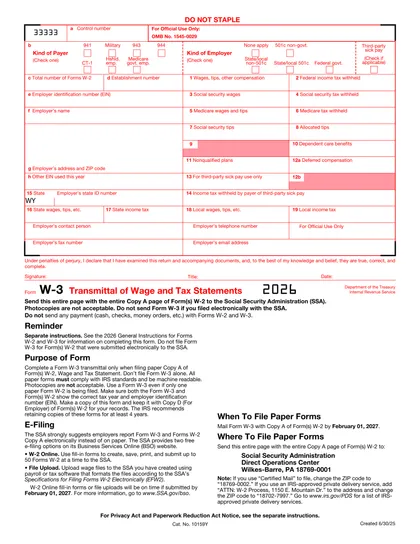
Form W-3, or the Transmittal of Wage and Tax Statements, is an important document that employers must submit to the Social Security Administration (SSA) each year. This form is used to report the total wages and tax withholdings for all employees, providing key information such as federal income tax withheld, Social Security wages, and Medicare taxes. By filing Form W-3, employers help the SSA track employee earnings and ensure accurate tax reporting and compliance with regulations. It is essential for employers to complete this form annually to fulfill their tax responsibilities.
Form W-3 is filed only when employers submit paper Forms W-2 to the SSA and is not required when W-2s are filed electronically.
What is Form W-3 used for?
Form W-3 is an important document for employers. Here’s what it’s used for:
- Summarizing Employee Data: Combines total wages, tips, and withholding from all employees' W-2 forms.
- Reporting to SSA: Submits this summary to the Social Security Administration.
- Reconciliation: Allows the SSA to reconcile totals from paper W-2 forms with employer wage records.
- Tax Compliance: Ensures accurate reporting of Social Security and Medicare taxes.
How to fill out Form W-3
Step 1: Confirm you need Form W-3
Use Form W-3 only if you are filing paper Copy An of Form(s) W-2 with the Social Security Administration. If you file W-2s electronically, you do not file Form W-3.
Step 2: Select payer and employer type
At the top of the form:
- Check the appropriate Kind of Payer (for example, 941 or 944).
- Check the Kind of Employer that describes your organization.
- Check Third-party sick pay only if it applies.
Step 3: Enter employer information
Complete the employer section:
- Box c – Total number of Forms W-2 included
- Box e – Employer Identification Number (EIN)
- Boxes f–g – Employer name and address
- Box d / h – Complete only if applicable
Step 4: Enter wage and tax totals
Add the combined totals from all W-2 forms:
- Boxes 1–6 – Wages and federal, Social Security, and Medicare taxes
- Boxes 7–8 – Tips, if applicable
- Box 9 – Leave blank
- Boxes 10–12 – Dependent care or deferred compensation, if applicable
Step 5: Complete state and local totals (if applicable)
If your W-2s include state or local wages:
- Fill Boxes 15–19 using totals from the W-2s
- File a separate Form W-3 for each state
Step 6: Add contact details and sign
Enter the employer’s contact information, then:
- Sign and date the form
- Add your title
- If signed by a third party, write “For (name of payer)”
Step 7: File the form
Mail Form W-3 together with Copy An of all Forms W-2
- Do not staple or include payment
- Use an official scannable paper form
- Send to the SSA address listed in the instructions
Who is required to fill out Form W-3?
Employers who need to file Form W-2, Wage and Tax Statement, are responsible for completing Form W-3, Transmittal of Wage and Tax Statements. This is essential for summarizing and transmitting W-2 forms to the Social Security Administration (SSA).
The SSA uses Form W-3 to collect summarized data from employers, facilitating the processing of employee wages and tax information.
Form W-3 is required only if the employer files paper Forms W-2; it is not used for electronic W-2 filings.
When is Form W-3 not required?
Form W-3 is not required if you do not file paper Forms W-2. Employers who submit W-2 forms electronically to the SSA do not file Form W-3. If you had no employees and did not issue any W-2 forms, Form W-3 is also not required.
When is Form W-3 due?
The deadline for Form W-3 is January 31 each year. If this date falls on a weekend or holiday, the due date shifts to the next business day. You may request an one-time 30-day extension by submitting Form 8809, but this is not automatically granted and requires a valid reason.
How to get a blank Form W-3
Visit our website to complete a fillable W-3 form online.
The Internal Revenue Service issues this form, and we have a blank version preloaded in our editor for you to fill out. Remember, our platform helps with filling and downloading, but not filing forms.
How to sign Form W-3
If you are filing a paper Form W-3, sign by hand in the designated signature box at the bottom of the form. If a transmitter or third-party is authorized to sign for the employer, they must write “For (name of payer)” next to the signature.
For electronic filing, the authorized signer uses a PIN or other SSA-approved electronic signature method through the Social Security Administration’s Business Services Online portal.
Where to file Form W-3?
To submit tax Form W-3, you must file it to the Social Security Administration (SSA). You can choose to file by mail it or submit it electronically.
If mailing, make sure your form meets SSA standards and is machine-readable. Photocopies won’t be accepted, so use the original.
Frequently asked questions
Fill Out IRS Form W-3 Online in 2026
Download Form