
Fill Out an Ohio Bill of Sale Online in 2026
Create a valid Ohio bill of sale for vehicles or personal property using our online form editor.
Get Form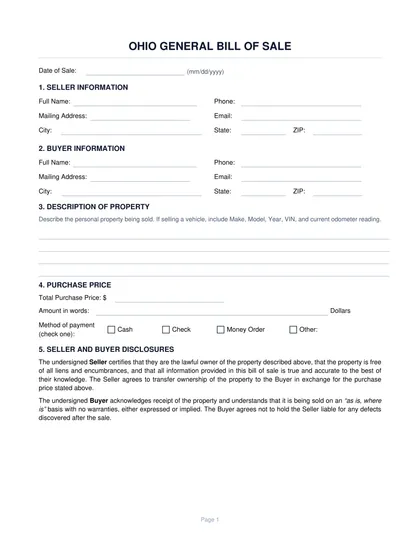
This site is not affiliated with any government, tax, or other official agency. Form last updated: 07/2026. Please verify you are using the current, correct version for your situation before submitting it.
How it works
1. Open the form
Access the pre-loaded form directly in our PDF editor. No need to upload anything!
2. Fill in your details
Carefully complete all required fields to ensure accuracy and validity.
3. Download as PDF
Save your filled-out form in PDF format, ready for submission or other needs.
What is an Ohio Bill of Sale?
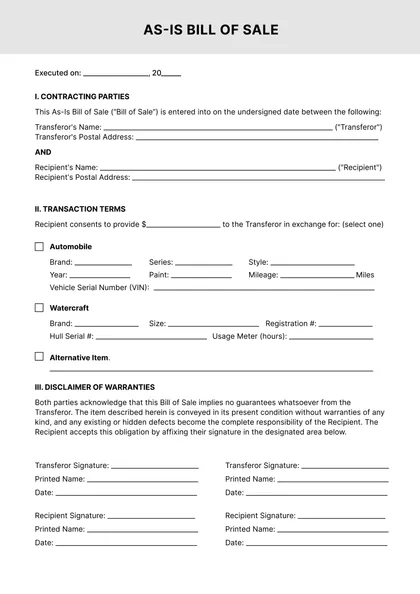
An Ohio bill of sale is a written document that records the private transfer of ownership of personal property—such as a motor vehicle, boat, or other asset—from a seller to a buyer. It documents the essential transaction terms: the names and addresses of both parties, a description of the item, the agreed sale price, and the date.
Ohio Bureau of Motor Vehicles (Ohio BMV) provides Form BMV 3724 as an official motor vehicle bill of sale. This form is used when applying for a vehicle title transfer and helps establish the purchase price for calculating Ohio's sales and use tax. Ohio also accepts general written bills of sale for vehicle transactions.
What is an Ohio Bill of Sale used for?
An Ohio bill of sale is used to formally document the transfer of personal property and protect both parties in a private sale. Specifically, it is used to:
- Document the transfer of personal property (vehicle, boat, firearm, equipment, or other items) from seller to buyer
- Establish the agreed purchase price on record — Ohio BMV uses this to calculate applicable sales tax, use tax, or registration fees when the buyer applies for a new title
- Protect the seller from future liability related to the property after the sale date
- Give the buyer proof of ownership pending receipt of a new title
- Serve as evidence in any dispute about the terms, price, or condition of the item at the time of sale
- Support insurance documentation — the buyer can present the bill of sale to their insurer as proof of acquisition and value
How to write a Bill of Sale in Ohio
Open the form – Use CookPDF's online editor to access a pre-loaded Ohio Bill of Sale template. No uploading or printing is required. Form BMV 3724 is also available from the Ohio BMV website.
Enter seller details – Provide the seller's full legal name and current address.
Enter buyer details – Include the buyer's full legal name and address.
Describe the property – For vehicles, include year, make, model, color, body type, and VIN. For other items, add a detailed description and any serial number.
Record the odometer reading – Required by federal law for all motor vehicle sales.
State the purchase price – Write the agreed amount clearly.
Add the date – Record the exact date the sale takes place.
Sign the document – Both the buyer and the seller sign and date the bill of sale.
What information should an Ohio Bill of Sale include?
An complete Ohio bill of sale should include the following information:
- Full legal name and current address of the seller
- Full legal name and current address of the buyer
- Detailed description of the item being sold — for vehicles: year, make, model, color, body type, and VIN; for other property: a clear description with any serial number
- Agreed purchase price
- Date of the transaction
- Current odometer reading at the time of sale (required by federal law for all motor vehicle transfers)
- Signatures of both the buyer and the seller
Is a Bill of Sale required in Ohio?
Ohio law does not require a bill of sale for all private property sales. However, for motor vehicle title transfers, the Ohio BMV recommends submitting a bill of sale to document the purchase price for sales and use tax purposes. If no bill of sale is provided, the tax may be assessed on the vehicle's book value.
For watercraft and outboard motor transfers, Ohio Department of Natural Resources may also request a bill of sale.
Does an Ohio Bill of Sale need to be notarized?
No. Ohio does not require a bill of sale to be notarized for it to be legally valid. An Ohio bill of sale is enforceable without notarization for most personal property transactions, including motor vehicles.
The Ohio BMV does not require notarization for vehicle title transfers. Notarization is optional and can be added for additional legal assurance.
How long is an Ohio Bill of Sale valid?
An Ohio bill of sale has no expiration date. Once both parties sign it, it becomes a permanent legal record of the transaction. Neither party needs to renew or re-execute the document—it remains valid indefinitely as long as it accurately reflects the completed sale.
Both the buyer and the seller should keep their signed copies for their personal records. For vehicle transactions, retain the bill of sale until the Ohio BMV has processed the title transfer and issued a new title in the buyer's name. The document may also be needed as proof of purchase for insurance, tax verification, or future ownership disputes.
Where can I get a blank Ohio Bill of Sale?
CookPDF provides a ready-to-use Ohio Bill of Sale template preloaded in our online editor. There is no need to download or upload anything in advance—simply open the form, fill in all required fields, add your electronic signature, and download the finished document as a PDF.
The official Form BMV 3724 is also available directly from the Ohio BMV website for vehicle transactions. CookPDF helps you prepare and download the document; delivering the signed bill of sale to the other party and submitting it to the Ohio BMV for title transfer remains your responsibility.
How to sign an Ohio Bill of Sale online
CookPDF makes it easy to sign your Ohio Bill of Sale online without printing or scanning. Once you have completed all required fields in the form, use the Sign tool in the editor. You can draw your signature with a mouse or trackpad, type your name, or upload a saved signature image. Position the signature in the designated field for the seller — if both parties are signing digitally, the buyer can do the same before the final download.
When your signatures are in place, click Done to download the completed PDF to your device. Electronic signatures are generally accepted for private-party bill of sale transactions in Ohio. If you plan to submit the bill of sale to the Ohio BMV as part of a title transfer, confirm in advance whether an original ink signature is required.
Frequently asked questions
Fill Out an Ohio Bill of Sale Online in 2026
Download Form