
This site is not affiliated with any government, tax, or other official agency. Form last updated: 07/2026. Please verify you are using the current, correct version for your situation before submitting it.
How it works
1. Open the form
Access the pre-loaded form directly in our PDF editor. No need to upload anything!
2. Fill in your details
Carefully complete all required fields to ensure accuracy and validity.
3. Download as PDF
Save your filled-out form in PDF format, ready for submission or other needs.
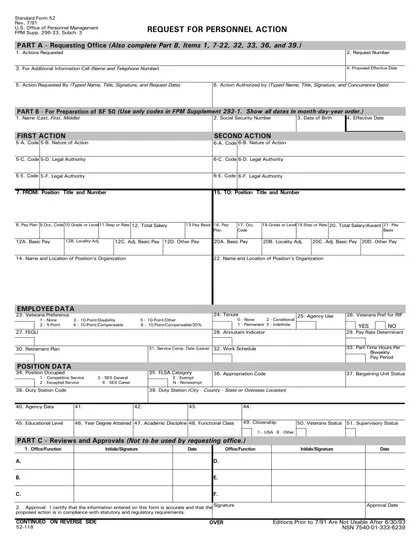
What is Form SF 52?
Form SF 52, Request for Personnel Action, is essential for federal employees and agencies. It is used to initiate personnel actions like hiring, promotions, or changes in employment status. Completing this form accurately helps ensure proper processing of requests, which affects job roles and benefits. Understanding its importance can help employees advocate for their career changes effectively and ensure compliance with federal regulations. Always follow official guidelines when filling out this form to avoid delays in processing.
What is Form SF 52 used for?
Form SF 52 is used by federal agencies to manage personnel actions. Here are its main purposes:
- to request hiring or promotions.
- to document changes in employee status.
- to initiate separations or transfers.
How to fill out Form SF 52?
Open Form SF 52 in the PDF editor.
Fill in your personal information in the designated fields, including your name and position.
Select the appropriate action from the dropdown menu.
Complete any additional sections relevant to your request.
Review all entries for accuracy.
Add your electronic signature.
Download the completed form for submission as instructed by your agency.
Who is required to fill out Form SF 52?
Supervisors or HR offices complete Form SF 52 for personnel actions. Employees may also use it for requests.
After completion, HR offices use the form to process the requested actions or updates.
When is Form SF 52 not required?
Form SF 52 is not necessary for normal within-grade increases or annual Foreign Service promotions.
Additionally, it isn't needed when an alternative approving document is used for mass transfers or realignments, for temporary details lasting 7 days or less, or when electronic personnel systems can automatically generate the required information.
When is Form SF 52 due?
The deadline for form SF 52 is as soon as the need for a personnel action is known. It should be submitted at least 10 workdays prior to the requested effective date of the action. For resignations, submit the form as soon as the employee gives notice.
For actions with specific timing requirements, follow your agency's policies. Remember that agencies may have their own internal deadlines and procedures, so it’s crucial to submit the form with enough lead time for proper processing before the desired effective date.
How to get a blank Form SF 52?
You can access a blank version of this form pre-loaded in our editor on our website, where you can fill it out and download it for your records.
Form SF 52 is issued by the U.S. federal government.
How to sign Form SF 52 online?
To sign form SF 52 online using CookPDF, first, click the "Fill Form" option. This will load a blank version of the SF 52 in the PDF editor, where you can fill in all required fields.
After completing the form, create a simple electronic signature for the signature field. Once finished, click "Done" to download the signed form. Always consult official sources for specific signature requirements related to the form.
Where to file Form SF 52?
DA Form 5888 must be submitted to the agency's local HR office or personnel office.
Submission methods: mail, electronic or in-person.
Frequently asked questions
Fill out Form SF 52 Online in 2026
Download Form