
Fill out Form SF 3112 Online in 2026
Complete your disability retirement application accurately
Get Form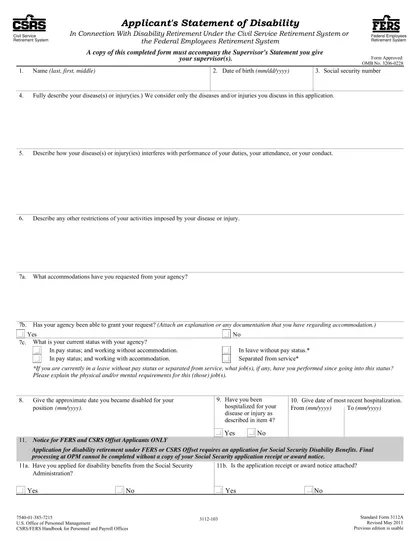
This site is not affiliated with any government, tax, or other official agency. Form last updated: 07/2026. Please verify you are using the current, correct version for your situation before submitting it.
How it works
1. Open the form
Access the pre-loaded form directly in our PDF editor. No need to upload anything!
2. Fill in your details
Carefully complete all required fields to ensure accuracy and validity.
3. Download as PDF
Save your filled-out form in PDF format, ready for submission or other needs.
What is Form SF 3112?
Form SF 3112, Documentation in Support of Disability Retirement Application, is essential for federal employees seeking disability retirement. This form helps verify that an employee is unable to continue working due to a medical condition. By providing necessary medical documentation and personal information, it supports the application process with the Office of Personnel Management (OPM). Completing this form accurately is crucial, as it impacts the approval of your disability retirement benefits and ensures you receive the support you need.
What is Form SF 3112 used for?
Form SF 3112 is used for applying for disability retirement benefits. It helps gather necessary information for the application process:
- to document the applicant's medical condition.
- to verify the applicant's employment history.
- to provide supporting evidence for the claim.
How to fill out Form SF 3112?
Open Form SF 3112 in the PDF editor.
Fill in your personal information in the designated fields.
Complete sections detailing your medical condition and work history.
Attach any necessary medical documentation by referencing the instructions.
Review your entries for accuracy.
Create an electronic signature, then click Done to download the completed form.
Who is required to fill out Form SF 3112?
Federal employees applying for disability retirement under FERS or CSRS must complete form SF 3112. Individuals with medical conditions affecting job performance also need this form.
After completion, the form is used by the Office of Personnel Management (OPM) to evaluate the disability retirement applications.
When is Form SF 3112 not required?
Form SF 3112 is not needed when an employee is applying for regular retirement instead of disability retirement. If an individual is not seeking disability retirement, they do not need to submit this form.
Additionally, employees who do not meet the minimum service requirements for disability retirement are also exempt from this form. Always check eligibility before submitting any documentation.
When is Form SF 3112 due?
The deadline for Form SF 3112 is when you apply for disability retirement. It must be submitted alongside your application, which is either SF 3107 for FERS or SF 2801 for CSRS.
If you are a current employee or have been separated for 30 days or less, submit it to your agency’s personnel office. For those separated for more than 30 days, send the form directly to OPM. It’s best to file it as soon as you know your medical condition will limit your work for at least one year.
How to get a blank Form SF 3112?
To get a blank SF 3112 form, which is issued by the U.S. Office of Personnel Management, simply visit our website. We have a pre-loaded version of the form ready for you to fill out and download.
How to sign Form SF 3112 online?
To sign Form SF 3112, start by opening CookPDF and selecting the "Fill Form" option. This will load the blank version of the form in the PDF editor. Fill in the necessary fields, including your personal information and details required for the disability retirement application.
Once you complete the form, you can create a simple electronic signature by selecting the signature field. After signing, click "Done" to download the completed form. Be sure to consult official sources for any specific signature requirements related to your application.
Where to file Form SF 3112?
Form SF 3112 must be submitted to the Office of Personnel Management (OPM).
Submission methods: mail.
Frequently asked questions
Fill out Form SF 3112 Online in 2026
Download Form