
This site is not affiliated with any government, tax, or other official agency. Form last updated: 07/2026. Please verify you are using the current, correct version for your situation before submitting it.
How it works
1. Open the form
Access the pre-loaded form directly in our PDF editor. No need to upload anything!
2. Fill in your details
Carefully complete all required fields to ensure accuracy and validity.
3. Download as PDF
Save your filled-out form in PDF format, ready for submission or other needs.
What is Form SF 2810?
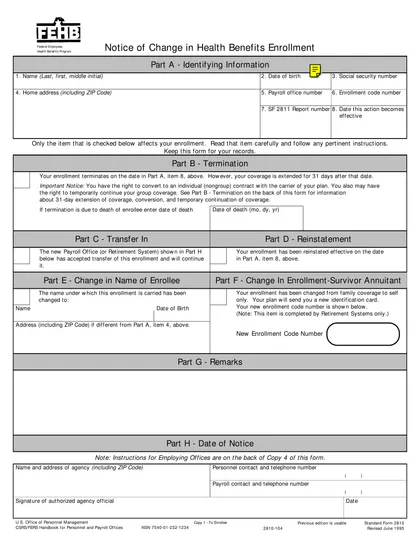
Form SF 2810, Notice of Change in Health Benefits Enrollment, is essential for federal employees wanting to update their health benefits. This form allows you to report changes such as marriage, divorce, or other life events that may affect your coverage. Submitting the SF 2810 ensures that your health benefits are accurately adjusted, preventing issues with coverage and premiums. Keeping your information current helps protect you and your family’s health needs. Always check the latest guidelines from the official Office of Personnel Management for proper filing instructions.
What is Form SF 2810 used for?
Form SF 2810 is used by federal employees to report changes in their health benefits. Here’s what it’s for:
- to notify changes in enrollment.
- to update personal information.
- to request a change in coverage.
How to fill out Form SF 2810?
Review the instructions on the form to understand requirements.
Fill in your personal information, including name, address, and employee details.
Indicate the reason for the change in health benefits enrollment.
Complete the sections related to your health benefits plan.
Sign the form electronically.
Download the completed form and submit it as per your agency's guidelines.
Who is required to fill out Form SF 2810?
Employing agencies are responsible for completing Form SF 2810 for health benefits changes. Typically, Human Resources or Personnel offices fill it out, with Payroll offices also involved in processing.
After the form is completed, it is used by health benefits providers to update enrollment records.
When is Form SF 2810 not required?
Form SF 2810 is not necessary for new enrollments, changes between plans, or coverage adjustments within a plan. Instead, use Form SF 2809 for these situations.
Additionally, if an employee with a Self Only enrollment changes their name due to marriage without altering their enrollment, they do not need to file Form SF 2810. Simple name changes that don’t impact enrollment also don’t require this form.
When is Form SF 2810 due?
The deadline for Form SF 2810 is as soon as you know the effective date of the change in health benefits enrollment. You should also submit it within 60 days after your enrollment ends to convert to non-group coverage.
If you are transferring, file the form before or right after the transfer takes place. For terminations, make sure to submit it no later than 60 days after enrollment has ended.
How to get a blank Form SF 2810?
To get a blank SF 2810, you can access it directly on our website. Our platform has a pre-loaded version ready for you to fill out and download.
This form is issued by the U.S. Office of Personnel Management (OPM).
How to sign Form SF 2810 online?
To sign form SF 2810 using CookPDF, first click on the "Fill Form" option. This action will open the blank version of the form in the PDF editor, where you can fill in the necessary information.
Once you have completed the form, you can create a simple electronic signature. After signing, click "Done" to download the completed form. Always consult official sources for specific signature requirements related to this form.
Where to file Form SF 2810?
Form SF 3112 must be submitted to the Office of Personnel Management (OPM).
Submission methods: mail.
Frequently asked questions
Fill out Form SF 2810 Online in 2026
Download Form