
This site is not affiliated with any government, tax, or other official agency. Form last updated: 07/2026. Please verify you are using the current, correct version for your situation before submitting it.
How it works
1. Open the form
Access the pre-loaded form directly in our PDF editor. No need to upload anything!
2. Fill in your details
Carefully complete all required fields to ensure accuracy and validity.
3. Download as PDF
Save your filled-out form in PDF format, ready for submission or other needs.
What is Form SF 1199A?
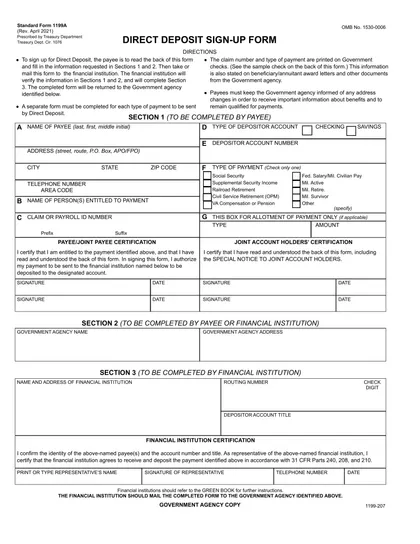
The Direct Deposit Sign-Up Form SF 1199A is used to set up direct deposit for federal benefits, such as Social Security or Veterans Affairs payments. By completing this form, you ensure your payments are automatically deposited into your bank account, making access to your funds quicker and safer. This eliminates the need for paper checks and helps prevent lost or stolen payments. Filling out this form accurately is essential for receiving your benefits on time.
What is Form SF 1199A used for?
The Direct Deposit Sign-Up Form SF 1199A is used to set up direct deposit for federal payments. Here’s what it helps with:
- to receive payments directly into a bank account.
- to ensure timely access to funds.
- to eliminate the need for paper checks.
How to fill out Form SF 1199A?
Open the Direct Deposit Sign-Up Form SF 1199A in the PDF editor.
Fill in your personal information, including your name and address.
Complete the banking information section with your account number and routing number.
Review all entered details for accuracy.
Create an electronic signature if required.
Click Done to download your completed form.
Submit the form to your financial institution as instructed.
Who is required to fill out Form SF 1199A?
Individuals receiving federal benefits, such as Social Security, must complete the Direct Deposit Sign-Up Form SF 1199A. This form is used to set up direct deposit for payments.
Afterward, the U.S. Department of the Treasury processes the forms to enable automatic payments to users' bank accounts.
When is Form SF 1199A not required?
You don't need to fill out the Direct Deposit Sign-Up Form SF 1199A if you prefer to receive paper checks for your payments. Also, if you are not eligible for direct deposit—such as certain non-residents or individuals receiving specific types of federal payments—this form isn't required.
Additionally, if you already have an existing direct deposit setup for your payments, you do not need to submit a new SF 1199A form.
When is Form SF 1199A due?
The deadline for the Direct Deposit Sign-Up Form SF 1199A is typically when you are first enrolling in a federal benefits program or making changes to your existing direct deposit information. It’s best to submit the form as soon as you start the application process to ensure timely payments.
Make sure to double-check that all your information is correct before sending it in. Incorrect details can delay your direct deposit, so take your time filling it out.
How to get a blank Form SF 1199A?
To get a blank Direct Deposit Sign-Up Form SF 1199A, simply visit our website and click on the Fill Form option. The form will load in our editor, allowing you to fill it out easily and download it once you're finished.
How to sign Form SF 1199A online?
To sign the Direct Deposit Sign-Up Form SF 1199A online using CookPDF, first, open the form in the PDF editor by clicking "Fill Form." Complete all necessary fields with accurate information. Once you are ready to sign, use the electronic signature feature provided by CookPDF to create and insert your signature into the designated area.
After signing, click "Done" to download your completed form. Remember to review the specific signature requirements from official sources to ensure compliance before submitting your form.
Where to file Form SF 1199A?
The Direct Deposit Sign-Up Form SF 1199A cannot be filed online. You need to print the completed form after filling it out.
Once printed, you can mail the form to the appropriate address. Ensure you double-check the mailing details for accuracy.
Frequently asked questions
Fill out Form SF 1199A Online in 2026
Download Form