
Fill out Form SF-1150 Online in 2026
Keep track of your leave information for accurate reporting
Get Form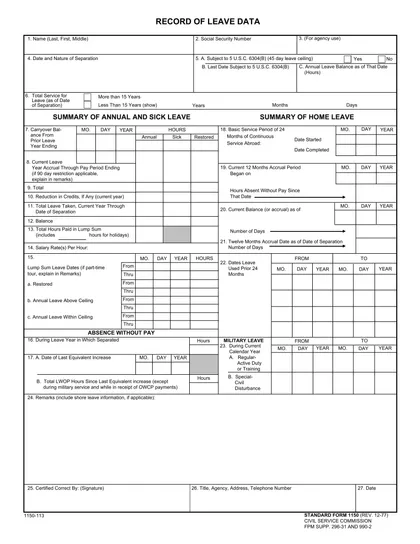
This site is not affiliated with any government, tax, or other official agency. Form last updated: 07/2026. Please verify you are using the current, correct version for your situation before submitting it.
How it works
1. Open the form
Access the pre-loaded form directly in our PDF editor. No need to upload anything!
2. Fill in your details
Carefully complete all required fields to ensure accuracy and validity.
3. Download as PDF
Save your filled-out form in PDF format, ready for submission or other needs.
What is Form SF-1150?
Form SF 1150, Record of Leave Data, is used by federal employees to track their annual and sick leave balances. This form helps ensure accurate record-keeping of leave taken and leave earned. It is important because it provides a clear summary of an employee's leave status, which can be crucial for planning time off, understanding benefits, and ensuring compliance with leave policies. Keeping this record up-to-date helps employees manage their leave effectively.
What is Form SF-1150 used for?
Form SF 1150 is used by federal employees to track their leave balances. Here’s what it helps with:
- to record annual leave.
- to document sick leave.
- to show leave without pay.
- to maintain accurate leave records.
How to fill out Form SF-1150?
Open the SF 1150 form in the PDF editor.
Fill in your personal identification information, including name and employee number.
Record the types of leave, such as annual and sick leave, in the appropriate sections.
Double-check your entries for accuracy.
Sign the form electronically.
Click Done to download your completed form.
Who is required to fill out Form SF-1150?
Form SF 1150 is completed by the losing agency when an employee transfers between federal agencies or separates from service. It tracks leave data for these transitions.
Once prepared, the form is used by the gaining agency or the employee for leave balance verification.
When is Form SF-1150 not required?
Form SF-1150 isn't needed in several cases. For instance, if an employee dies while in federal service, there's no requirement to complete this form.
Additionally, employees who haven't completed a full pay period on the agency's rolls, unless they have leave credit from previous federal service, also don't require it. Finally, employees separating from federal service without transferring to another agency do not need to file this form.
When is Form SF-1150 due?
The deadline for Form SF 1150 is not set on a specific date. Instead, it is filled out during particular situations.
You need to prepare this form when an employee leaves federal service, except in cases of death or if they haven't completed a full pay period. It is also required when an employee transfers to another federal agency without a break in service longer than three years.
How to get a blank Form SF-1150?
To obtain a blank SF 1150, you can access it through our platform. Remember, our website helps with filling and downloading, but not filing forms.
This form is issued by the U.S. government and is ready to fill out in our editor.
How to sign Form SF-1150 online?
To sign form SF 1150 online using CookPDF, first, open the blank version of the form in the PDF editor by clicking the "Fill Form" option. Complete all necessary fields and then create your electronic signature within the platform.
After finishing the form, click "Done" to download it. Remember to consult official sources for specific signature requirements before finalizing your submission to ensure compliance.
Where to file Form SF-1150?
SF-1150 must be submitted to the U.S. Customs and Border Protection (CBP) at the port of entry where the applicant is seeking admission into the United States.
Sumbission methods: in person.
Frequently asked questions
Fill out Form SF-1150 Online in 2026
Download Form