
This site is not affiliated with any government, tax, or other official agency. Form last updated: 07/2026. Please verify you are using the current, correct version for your situation before submitting it.
How it works
1. Open the form
Access the pre-loaded form directly in our PDF editor. No need to upload anything!
2. Fill in your details
Carefully complete all required fields to ensure accuracy and validity.
3. Download as PDF
Save your filled-out form in PDF format, ready for submission or other needs.
What is Form IT-2104?
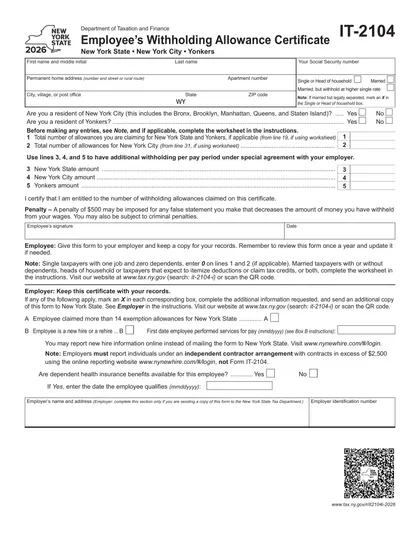
Form IT-2104, the Employee's Withholding Allowance Certificate, is used by employees in New York to determine how much state income tax should be withheld from their paychecks. By providing information about allowances, dependents, and other factors, this form helps ensure that the right amount of tax is deducted. Completing this form accurately is important to avoid owing money at tax time or having too much withheld, which can impact your take-home pay throughout the year.
What is Form IT-2104 used for?
Form IT-2104 helps determine the amount of state tax withheld from your paycheck:
- to inform your employer about your withholding allowances.
- to claim exemption from withholding if eligible.
- to update your withholding status as needed.
How to fill out Form IT-2104?
Review the form’s instructions to understand your withholding options.
Fill in your personal information, including your name, address, and Social Security number.
Indicate your allowances by completing the relevant sections based on your situation.
Sign and date the form at the bottom.
Submit the completed form to your employer for processing.
Who is required to fill out Form IT-2104?
Form IT-2104 must be completed by new employees, those who experienced life changes like marriage or divorce, and employees with significant income changes.
After completion, this form is used by employers to determine the amount of tax to withhold from employees' wages.
When is Form IT-2104 not required?
Form IT-2104 isn't needed if your personal or financial situation hasn't changed since your last filing. If you're exempt from withholding, you should use Form IT-2104-E instead.
Always ensure you meet the criteria before deciding not to file. Keeping your forms updated helps to avoid issues with your tax withholding.
When is Form IT-2104 due?
The deadline for Form IT-2104 is not fixed. It should be submitted when starting a new job, annually if the employee's situation has changed, or whenever an employee’s tax situation changes and they need to update their allowances.
It's important to keep your withholding information current to avoid underpayment or overpayment of taxes. Always check with your employer or the IRS for any specific guidelines related to your situation.
How to get a blank Form IT-2104?
To get a blank IT-2104, you can visit our platform where the form is pre-loaded and ready for you to fill out.
This form is issued by the New York State Department of Taxation and Finance.
How to sign Form IT-2104 online?
To sign form IT-2104 using CookPDF, first, click on the "Fill Form" option to load the blank version of the form in the PDF editor. After filling out the necessary fields, you can create a simple electronic signature within the platform. Once you've added your signature, click "Done" to download the completed form.
It’s important to check the official guidelines regarding signature requirements for form IT-2104. Ensure that the method you choose meets the necessary standards for submission to the IRS or your state tax authority.
Where to file Form IT-2104?
Form DTF-802 must be submitted to the employer, not directly to a tax authority.
Submission methods: in-person, mail or online.
Frequently asked questions
Fill out Form IT-2104 Online in 2026
Download Form