
This site is not affiliated with any government, tax, or other official agency. Form last updated: 07/2026. Please verify you are using the current, correct version for your situation before submitting it.
How it works
1. Open the form
Access the pre-loaded form directly in our PDF editor. No need to upload anything!
2. Fill in your details
Carefully complete all required fields to ensure accuracy and validity.
3. Download as PDF
Save your filled-out form in PDF format, ready for submission or other needs.
What is Form I-90?
Form I-90, the Application to Replace Permanent Resident Card, is used by lawful permanent residents to request a new Green Card. This form is important because it helps ensure that your identification remains current and valid.
You may need to file it to renew an expiring or expired Green Card, to replace a card that is lost, stolen, damaged, or was never received, to correct a DHS error on the card, to update personal information such as your name, or if you have reached age 14 and need to register.
What is Form I-90 used for?
Form I-90 is used by lawful permanent residents to request a replacement for their Green Card:
- to renew an expiring or expired 10-year Green Card.
- to replace a lost, stolen, damaged, or mutilated card.
- to replace a card that was issued but never received.
- to correct incorrect information caused by a DHS error.
- to update personal information, such as a legal name change.
- to register upon reaching age 14.
- to replace an outdated card version (e.g., old Form AR-3, I-151, or prior editions).
- to update status changes such as commuter to resident or vice versa.
How to fill out Form I-90?
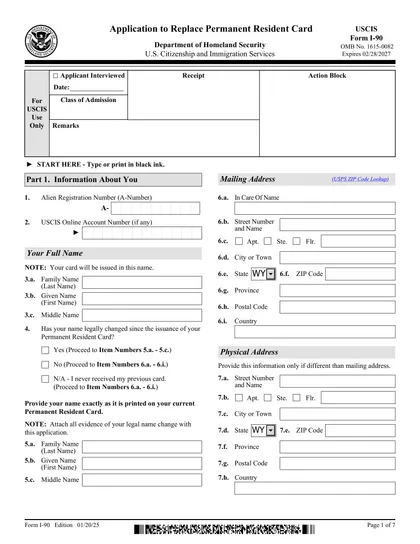
Part 1 — Information About You:
A-Number: Enter your Alien Registration Number, found on your current or previous Green Card.
USCIS Online Account Number: Enter if you have one from a prior online filing. Otherwise, leave blank.
Full legal name: Enter your family name (last name), given name (first name), and middle name. Your new card will be issued in this name.
Name change: Indicate whether your name has changed since your card was issued. If "Yes," provide your new legal name and attach evidence (court order, marriage certificate, etc.). If "No" or "N/A" (never received card), skip to your mailing address.
Mailing address: Provide the U.S. address where you want to receive your new card. USCIS mail is not forwarded by USPS, so ensure this address is current.
Physical address: Provide only if different from your mailing address.
Personal details: Enter your gender, date of birth, country, and city/town of birth, mother's and father's names.
Class of admission: Enter the visa category under which you were admitted as a permanent resident (e.g., IR1, F2A, EB-3). Found on your Green Card or immigrant visa.
Date of admission: Enter the date you were granted permanent resident status.
U.S. Social Security Number: Enter if you have one.
Part 2 — Application Type:
Item 1: Check your status type — lawful permanent resident, permanent resident in commuter status, or conditional permanent resident. This determines which section (An or B) to complete.
Section A (lawful permanent residents and commuters) — Select only one reason:
- 2.a. Card lost, stolen, or destroyed.
- 2.b. Card issued but never received. (No fee required.)
- 2.c. Card has been mutilated.
- 2.d. Card has incorrect data due to DHS error. (No fee required.)
- 2.e. Name or other biographical information has legally changed.
- 2.f. Card will expire within 6 months or has already expired.
- 2.g.1. Reached age 14 and card will expire after 16th birthday. (No fee required.)
- 2.g.2. Reached age 14 and card will expire before 16th birthday.
- 2.h. Taking up commuter status or converting from commuter to resident.
- 2.i. Prior card version is no longer valid (e.g., old AR-3 or I-151).
- 2.j. Status automatically converted to permanent resident.
- 2.k. Other reason (explain).
Section B (conditional permanent residents) — Select one reason:
- 3.a. Card lost, stolen, or destroyed.
- 3.b. Card issued but never received.
- 3.c. Card has been mutilated.
- 3.d. Card has incorrect data due to DHS error.
- 3.e. Name or other biographical information has legally changed.
If you answered "Yes" to questions 4 or 5 in Section B (regarding removal proceedings or prior denials), provide a detailed explanation.
Part 3 — Processing Information:
Item 1: Enter the location (city, state, or country) where you applied for an immigrant visa or adjustment of status.
Item 2: Enter the location where your immigrant visa was issued, or adjustment of status was granted.
Items 3.a.–3.a.1.: If you entered the U.S. with an immigrant visa, provide the consulate location and date of issuance.
Part 4 — Accommodations for Individuals with Disabilities and/or Impairments:
- Check "Yes" if you need accommodations (e.g., sign language interpreter, wheelchair accessibility) and describe what you need. USCIS will try to accommodate your request.
Part 5 — Applicant's Statement, Contact Information, Certification, and Signature:
Item 1.a. or 1.b.: Indicate whether you read and understand English (1.a.) or used an interpreter (1.b.).
Contact information: Provide your daytime phone number, mobile number, and email address.
Certification and signature: Read the certification statement, then sign and date the form. By signing, you certify under penalty of perjury that all information is complete, true, and correct.
Part 6 — Interpreter's Contact Information (if applicable):
- If an interpreter helped you, provide their name, business name and address, contact number, email, and their signature and date.
Part 7 — Contact Information, Declaration, and Signature of the Person Preparing This Application (if applicable):
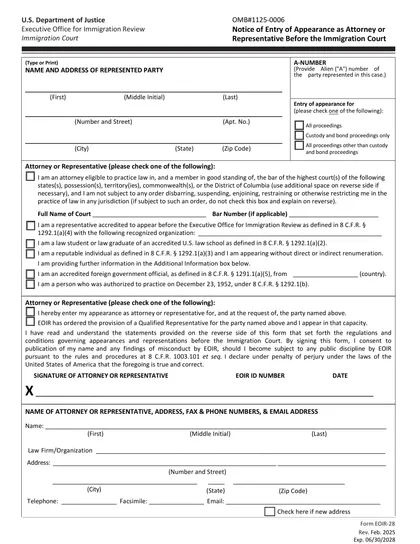
- If someone else prepared the form for you, they must provide their name, business information, contact details, and signature. If the preparer is an attorney or accredited representative, they must also file Form G-28.
Part 8 — Additional Information:
- Use this space for any additional information that didn't fit in prior sections. Reference the page number, part number, and item number for each continuation.
Gather Supporting Documents and File:
Supporting documents vary depending on the reason for filing. Common documents include: a copy of your current Green Card (front and back), evidence of legal name change, government-issued photo ID if the card is unavailable, and the original incorrect card if filing for DHS error correction.
Online: Create an USCIS online account, complete the form, upload documents, pay $415, and submit.
By mail: Print and sign the form, include Form G-1450 (credit/debit card payment) or Form G-1650 (ACH bank payment) for the $465 fee, and mail to: USCIS Attn: I-90, P.O. Box 21262, Phoenix, AZ 85036-1262 (USPS).
Who is required to fill out Form I-90?
Lawful permanent residents and permanent residents in commuter status must complete an I-90 application to replace or renew their Green Card. Conditional permanent residents may also use Form I-90 to replace a lost, stolen, or damaged card, but NOT to remove conditions — that requires Form I-751 or I-829. Common reasons include: expiring or expired cards, lost/stolen/damaged cards, name changes, reaching age 14, DHS errors on the card, and outdated card versions.
After completion, the form is used by immigration authorities to process requests for Green Card replacements or renewals.
When is Form I-90 not required?
You don't need to file Form I-90 if you are a conditional permanent resident whose 2-year Green Card is about to expire — instead, file Form I-751 (marriage-based) or Form I-829 (investment-based) to remove conditions. However, conditional residents may use Form I-90 to replace a lost, stolen, or damaged card, provided it is not within 90 days of expiration.
When is Form I-90 due?
The deadline for Form I-90 varies based on the situation. For Green Card renewal, you should file within 6 months before your card expires. If your card is lost, stolen, or damaged, file a report as soon as you can.
Additionally, if you have a name change or need to update biographical information, submit the form when the change happens. If you did not file within 30 days of turning 14, you must still file, but you should select the reason that your card has expired or will expire within 6 months, rather than the age-14 reason.
How to get a blank Form I-90
You can access a blank version of this form already pre-loaded in our platform, ready for you to fill out and download.
The U.S. Citizenship and Immigration Services (USCIS) issues Form I-90.
How to sign Form I-90
You can fill out and electronically sign Form I-90 using CookPDF's built-in e-signature tool — simply draw, type, or upload your signature directly on the form. If filing by mail, print the completed form and add your handwritten signature in the designated area in Part 5. If filing online through USCIS, you will sign electronically through your USCIS online account.
In both cases, USCIS will also require you to appear for a biometrics appointment, where you will provide fingerprints, a photograph, and sign an oath reaffirming the information in your application.
Where to file Form I-90?
Form I-90 must be submitted to U.S. Citizenship and Immigration Services (USCIS). You can file online by creating an USCIS online account or by mail.
Frequently asked questions
Fill out USCIS Form I-90 Online in 2026
Download Form