
Fill out FS Form 1201 W-DFAS Online in 2026
Complete your official request for military pay in 2026
Get Form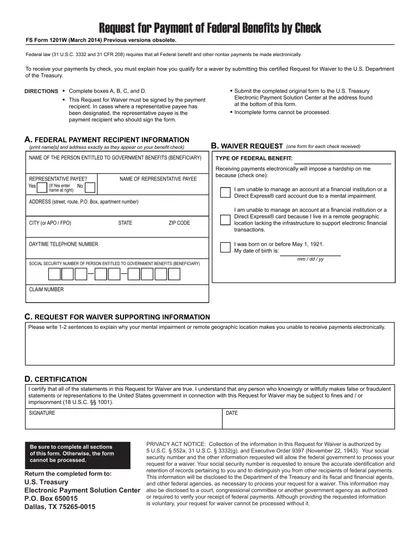
This site is not affiliated with any government, tax, or other official agency. Form last updated: 07/2026. Please verify you are using the current, correct version for your situation before submitting it.
How it works
1. Open the form
Access the pre-loaded form directly in our PDF editor. No need to upload anything!
2. Fill in your details
Carefully complete all required fields to ensure accuracy and validity.
3. Download as PDF
Save your filled-out form in PDF format, ready for submission or other needs.
What is FS Form 1201?
FS Form 1201, Request for Payment of Federal Benefits by Check, allows individuals to request that their federal benefits be issued via check instead of direct deposit. While federal law typically mandates electronic payments, exceptions can be made for valid reasons, including mental impairments or living situations that complicate electronic transactions. Completing this form ensures that you can receive your benefits in a secure and convenient manner through a check, accommodating your specific needs.
What is FS Form 1201 used for?
FS Form 1201 is important for those needing federal benefits. Here’s what it does:
- Requests payment by check instead of direct deposit.
- Explains qualifications for waiving the electronic funds transfer requirement.
- Provides identification and address details for processing.
- Ensures secure access to federal benefits.
How to fill out FS Form 1201?
Complete boxes A, B, C, and D with your personal details and address as they appear on your benefit check.
Indicate the type of benefits you are requesting.
Provide any supporting information, such as account numbers if needed.
Double-check all entries for accuracy.
Submit the completed form to the U.S. Treasury Electronic Payment Solution Center at the address listed at the bottom of the form.
Who is required to fill out FS Form 1201?
The groups responsible for completing FS Form 1201 include the payment recipient and, if applicable, the representative payee. The payment recipient must provide their name and address as they appear on their benefit check, while the representative payee should also sign the form.
After completing the form, the original must be submitted to the U.S. Treasury Electronic Payment Solution Center. This is required to request a waiver for receiving federal benefit payments by check rather than electronically.
When is FS Form 1201 not required?
You don’t need FS Form 1201 if you qualify for a waiver, meaning you don’t have a mental impairment or live in an area with electronic payment options. You also won’t require this form if you receive payments through direct deposit or other methods.
When is FS Form 1201 due?
The deadline for FS Form 1201, Request for Payment of Federal Benefits by Check, varies based on the payment schedule set by the federal agency. To prevent delays, submit the form as soon as you are eligible. It’s important to check specific due dates that apply to your circumstances. Always remember to keep a copy for your records after completing the form.
How to get a blank FS Form 1201?
To get a blank FS Form 1201, simply visit our website. The U.S. Department of the Treasury issues this form through the Defense Finance and Accounting Service (DFAS). Our platform has a pre-loaded version ready for you to fill and download. Remember, we assist with filling and downloading, but not filing forms.
How to sign FS Form 1201 online?
To sign the FS Form 1201, Request for Payment of Federal Benefits by Check, you need a handwritten signature, as electronic signatures are not accepted. Ensure that the form is signed by the payment recipient or their designated representative payee. After filling out the form using CookPDF, remember to download it for your records. Always check for the latest updates to ensure compliance with current regulations, as CookPDF does not support submission.
Where to file FS Form 1201?
To submit FS Form 1201, send the completed original to the U.S. Treasury's Electronic Payment Solution Center by mail. Remember, it can't be filed online.
Ensure the form is signed by the payment recipient or their representative payee. Incomplete forms will not be processed, so double-check your entries!
Frequently asked questions
Fill out FS Form 1201 W-DFAS Online in 2026
Download Form