
Fill out Form FMS 2231 Online in 2026
Set up your direct deposit for quick payments and refunds
Get Form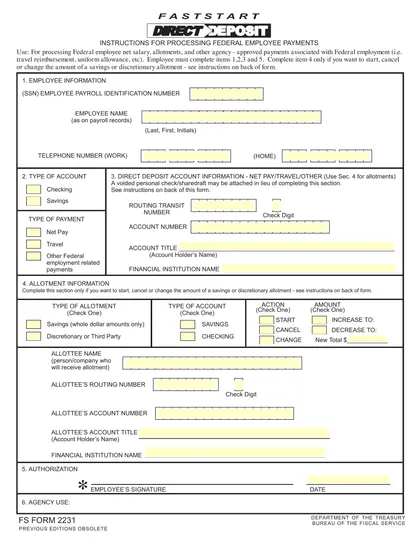
This site is not affiliated with any government, tax, or other official agency. Form last updated: 07/2026. Please verify you are using the current, correct version for your situation before submitting it.
How it works
1. Open the form
Access the pre-loaded form directly in our PDF editor. No need to upload anything!
2. Fill in your details
Carefully complete all required fields to ensure accuracy and validity.
3. Download as PDF
Save your filled-out form in PDF format, ready for submission or other needs.
What is Form FMS 2231?
The Direct Deposit Enrollment Form FMS 2231 is used to set up direct deposit for federal payments, like Social Security or tax refunds, into your bank account. This form is important because it ensures you receive your payments directly, which is often faster and more secure than receiving a check by mail. By providing your bank details on this form, you can manage your finances better and avoid delays in accessing your funds.
What is Form FMS 2231 used for?
The Direct Deposit Enrollment Form FMS 2231 is important for setting up direct deposit for federal payments. Here's what it is used for:
- to provide banking information for deposits.
- to enroll in automatic payments from the government.
- to ensure timely receipt of funds.
How to fill out Form FMS 2231?
Open the Direct Deposit Enrollment Form FMS 2231 in the PDF editor.
Fill in your personal information, including name, address, and Social Security Number.
Enter your bank account details (account number and routing number).
Review all entered information for accuracy.
Add your electronic signature if required.
Click Done to download the completed form.
Submit the form as instructed by your agency.
Who is required to fill out Form FMS 2231?
The Direct Deposit Enrollment Form FMS 2231 is completed by individuals or entities receiving federal payments, like Social Security. This includes beneficiaries and vendors involved in government contracts.
After submission, the form is used by the U.S. Treasury to set up direct deposits for those payments.
When is Form FMS 2231 not required?
If you already receive federal payments via direct deposit, you don’t need to fill out the Direct Deposit Enrollment Form FMS 2231 again. This includes payments like Social Security or veterans' benefits that are already sent directly to your bank account.
Additionally, if you choose to receive payments by check instead of direct deposit, you do not need to complete this form. Always check your payment preferences to avoid unnecessary paperwork.
When is Form FMS 2231 due?
The deadline for the Direct Deposit Enrollment Form FMS 2231 is typically when you are first applying for benefits or making changes to your direct deposit information. It’s important to submit it as soon as possible to avoid any delays in receiving your payments.
Make sure to provide all required information accurately. Check for any specific instructions related to your benefits or payment type to ensure your form is processed without issues.
How to get a blank Form FMS 2231?
To get a blank Direct Deposit Enrollment Form FMS 2231, simply visit our website and click on the Fill Form option. The form will load in our editor, allowing you to fill in the necessary information before downloading it for your records.
How to sign Form FMS 2231 online?
To sign the Direct Deposit Enrollment Form FMS 2231 online using CookPDF, first, access the form through the CookPDF platform. Click on "Fill Form" to load the blank version in the PDF editor. Fill out the necessary details, and when you are ready to sign, create a simple electronic signature within the tool.
Once your signature is added, click "Done" to download the completed form. Before submitting, check the official IRS guidelines for any specific requirements related to signatures on this form.
Where to file Form FMS 2231?
The Direct Deposit Enrollment Form FMS 2231 can be filled out online or printed for mailing. However, it cannot be submitted electronically.
To file by mail, print the completed form and send it to the appropriate address listed on the form. Be sure to keep a copy for your records.
Frequently asked questions
Fill out Form FMS 2231 Online in 2026
Download Form