
Fill out Form DD 3 Online in 2026
Provide necessary information for your military benefits request.
Get Form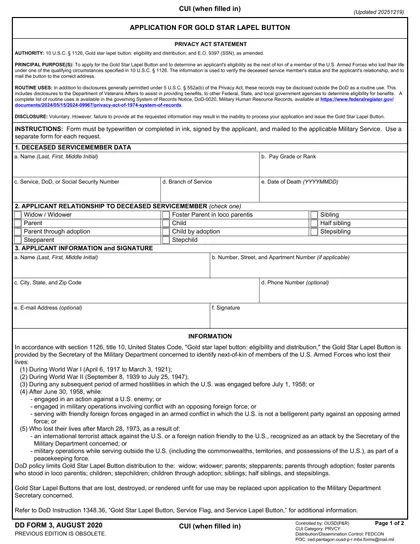
This site is not affiliated with any government, tax, or other official agency. Form last updated: 07/2026. Please verify you are using the current, correct version for your situation before submitting it.
How it works
1. Open the form
Access the pre-loaded form directly in our PDF editor. No need to upload anything!
2. Fill in your details
Carefully complete all required fields to ensure accuracy and validity.
3. Download as PDF
Save your filled-out form in PDF format, ready for submission or other needs.
What is DD Form 3?
Form DD 3, known as the Application for Gold Star Lapel Button, is a document issued by the Department of Defense. It is intended for next of kin of service members who have died in certain conflicts to apply for the Gold Star Lapel Button. This button serves as a poignant symbol of recognition and honor for the sacrifices made by their loved ones. Completing this form is crucial for family members wishing to obtain this official decoration, allowing them to express their pride and respect for the fallen service member.
What is DD Form 3 used for?
The DD Form 3 is important for recognizing the sacrifice of fallen service members. Here’s what it’s used for:
- Requesting a Gold Star Lapel Button for eligible family members
- Identifying next of kin, including:
- Widow/widower
- Parents and stepparents
- Adoptive parents and foster parents
- Children and stepchildren
- Siblings, half siblings, and stepsiblings
How to fill out DD Form 3?
Enter the deceased servicemember's data: name, pay grade or rank, service, DoD or Social Security Number, and branch of service.
Input the date of death in YYYYMMDD format.
Indicate your relationship to the deceased servicemember (e.g., widow, widower, parent, etc.).
Complete a separate form for each request.
Download the completed form and mail it to the applicable Military Service.
Who is required to fill out DD Form 3?
The groups responsible for completing Form DD 3 include widows, widowers, parents, stepparents, adoptive parents, foster parents in loco parentis, siblings, children, half siblings, children by adoption, and stepsiblings.
Once the form is completed, these eligible individuals will receive a Gold Star Lapel Button, which signifies their relationship to a deceased service member.
When is DD Form 3 not required?
DD Form 3 is not required if you do not have an immediate family member who died in active military service. Additionally, veterans or service members who have not lost a family member in the line of duty also do not need to fill out this form.
When is DD Form 3 due?
The deadline for DD Form 3, Application for Gold Star Lapel Button, is when an eligible individual requests either a replacement button or an initial button. Each request requires a separate form that must be typewritten or filled out in ink, signed by the applicant, and mailed to the appropriate Military Department.
How to get a blank DD Form 3?
To get a blank DD Form 3, simply visit our website. The Department of Defense issues this form, and we have it ready for you in our editor. Remember, our platform allows you to fill and download the form but does not support filing it.
How to sign DD Form 3 online?
To sign Form DD 3, Application for Gold Star Lapel Button, you will need a handwritten signature. The form must be completed in ink or typewritten, and it's important to remember that electronic signatures aren't recognized for this application. After filling out the form using CookPDF’s tools, you can download it for your records. Be sure to check for the latest updates on the form requirements before submission, as CookPDF does not support that process.
Where to file DD Form 3?
To submit Form DD 3, send it to your applicable Military Service's office. Ensure it is typewritten or filled out in ink.
Remember to sign the form before mailing it to the correct address. Note that online submission is not available.
Frequently asked questions
Fill out Form DD 3 Online in 2026
Download Form