
This site is not affiliated with any government, tax, or other official agency. Form last updated: 07/2026. Please verify you are using the current, correct version for your situation before submitting it.
How it works
1. Open the form
Access the pre-loaded form directly in our PDF editor. No need to upload anything!
2. Fill in your details
Carefully complete all required fields to ensure accuracy and validity.
3. Download as PDF
Save your filled-out form in PDF format, ready for submission or other needs.
What is DA Form 6?
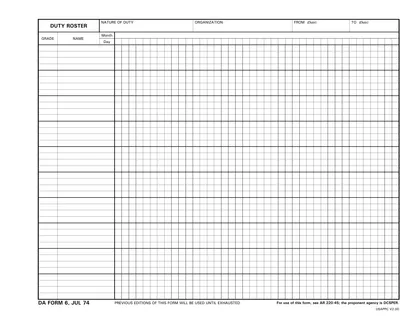
DA Form 6, also known as the Duty Roster, is an official Army form used to schedule daily duties for soldiers. This form helps ensure that all necessary tasks are assigned and managed effectively, promoting accountability and teamwork. By clearly outlining responsibilities, it aids in planning and communication within units. Properly filling out this form is essential for maintaining order and efficiency in military operations, making it an important tool for leaders and personnel alike.
What is DA Form 6 used for?
DA Form 6 is used by military units to manage personnel assignments. It helps to:
- to assign specific duties to personnel.
- to track duty schedules for accountability.
- to communicate expectations to team members.
How to fill out DA Form 6?
Open DA Form 6 in the PDF editor.
Fill in the required fields such as unit information and duty assignments.
Review your entries for accuracy.
Add an electronic signature.
Save your completed form.
Download the document for submission.
Submit the form to your supervisor as directed.
Who is required to fill out DA Form 6?
Unit leadership, commanders, and personnel managers complete DA Form 6 for duty roster purposes. They ensure accuracy and compliance.
Afterward, unit leadership and commanders use the form to manage and verify duty assignments effectively.
When is DA Form 6 not required?
If a unit has received written approval from the Deputy Chief of Staff, G-1, to use alternative methods that align with AR 220-45's intent, they do not need to complete DA Form 6.
Additionally, for special duty details like temporary assignments outside normal duty rosters, the form is not required. When automated systems generate equivalent records, DA Form 6 might still be needed for backup but is not mandatory in all cases.
When is DA Form 6 due?
The deadline for DA Form 6 is the 25th of the month before the roster is to take effect. This allows time for Soldier notifications and any exceptions that may need to be made.
Exceptions, such as leave or Temporary Duty (TDY), should be submitted by the 23rd of the month. If forms are not submitted on time, it can lead to unfair assignments and administrative issues.
How to get a blank DA Form 6?
To obtain a blank DA Form 6, simply visit our platform where you can find the form pre-loaded and ready for you to fill out. Please remember, our website assists in filling and downloading forms, but does not support filing them.
U.S. Department of the Army issues this form.
How to sign DA Form 6 online?
To sign DA Form 6, using CookPDF, first open the form in the PDF editor by clicking "Fill Form." Fill out the required fields as needed. Once completed, look for the option to create a simple electronic signature.
After creating your electronic signature, place it in the designated signature area of the form. Remember to download the signed form by clicking "Done." For specific signature requirements, consult official sources to ensure compliance.
Where to file DA Form 6?
DA Form 6 is an internal unit-level administrative document and does not require external submission.
Frequently asked questions
Fill out DA Form 6 Online in 2026
Download Form