
This site is not affiliated with any government, tax, or other official agency. Form last updated: 07/2026. Please verify you are using the current, correct version for your situation before submitting it.
How it works
1. Open the form
Access the pre-loaded form directly in our PDF editor. No need to upload anything!
2. Fill in your details
Carefully complete all required fields to ensure accuracy and validity.
3. Download as PDF
Save your filled-out form in PDF format, ready for submission or other needs.
What is Form T3?
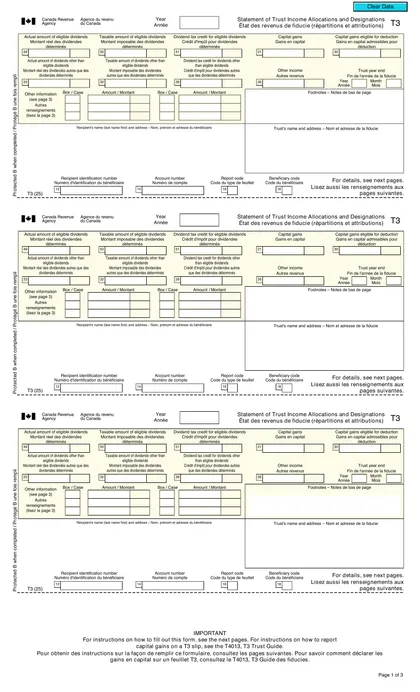
The Form T3, Statement of Trust Income Allocations and Designations, is essential for trusts in Canada. It reports income and credits, clearly identifying beneficiaries and detailing how much income each receives. This form plays a crucial role in ensuring that the trust's income is fairly allocated, promoting transparency in financial activities. Essentially, it acts like a report card for the trust’s earnings, allowing the government to monitor the distribution of income among beneficiaries effectively.
What is Form T3 used for?
Form T3 is essential for trusts in Canada. Here's what it’s used for:
- Reporting Trust Income: Trustees report the trust's income, gains, losses, and relevant information.
- Identifying Beneficiaries: It identifies beneficiaries and reports amounts like designated income and credits.
- Providing Beneficiary Information: Beneficiaries use it to report trust income on their personal tax return.
- Compliance with Tax Regulations: The form ensures compliance with Canadian tax regulations regarding trusts.
How to fill out Form T3?
Gather necessary documents like the trust deed and financial statements.
Complete the T3RET, T3SUM, and T3 slip forms in the editor.
Report beneficial ownership on Schedule 15.
Estimate income if needed, and ensure all required documents are ready for filing.
Download the completed forms for submission via mail or electronic filing.
Who is required to fill out Form T3?
Trusts in Canada are responsible for completing Form T3, Statement of Trust Income Allocations and Designations. They must report financial and tax-related information to the Canada Revenue Agency (CRA).
The CRA uses the information from Form T3 to verify compliance with tax laws, assess tax liabilities, and ensure that all necessary stakeholders are identified.
When is Form T3 not required?
Form T3 is not required for bare trusts, as per CRA's announcement on October 29, 2024, unless certain conditions apply. Additionally, tax-favored foreign retirement trusts and non-retirement savings trusts are exempt from filing Forms 3520 and 3520-A.
When is Form T3 due?
The deadline for Form T3 is 90 days after the trust's tax year-end. This due date also includes any payments for balances owing. If you need to, you can estimate the income at first, but any differences must be corrected through a reassessment and submission of the necessary documents to the CRA.
How to get a blank Form T3?
To get a blank Form T3, simply visit our website. The form, issued by the CRA, is pre-loaded in our editor, allowing you to fill it out quickly. Remember, CookPDF aids in filling and downloading but not filing forms, so you'll need to submit it separately to the CRA.
Do you need to sign Form T3?
You do not need to sign Form T3. This form is completed by the trustee or administrator, and a signature is not required. However, it's always a good idea to check for the latest updates to ensure compliance. Once you fill out the form using CookPDF, you can download it for your records, but remember that submission and sharing are not supported.
Where to file Form T3?
Form T3 can be submitted electronically or by mail. For electronic filing, complete the T183TRUST Information Return and consider using a My Trust Account for efficiency.
If submitting more than five T3 Slips, file them digitally through web forms. Electronic filing is suggested for faster processing, making your tax duties simpler.
Frequently asked questions
Fill Out Form T3 Online in 2026
Download Form