
This site is not affiliated with any government, tax, or other official agency. Form last updated: 07/2026. Please verify you are using the current, correct version for your situation before submitting it.
How it works
1. Open the form
Access the pre-loaded form directly in our PDF editor. No need to upload anything!
2. Fill in your details
Carefully complete all required fields to ensure accuracy and validity.
3. Download as PDF
Save your filled-out form in PDF format, ready for submission or other needs.
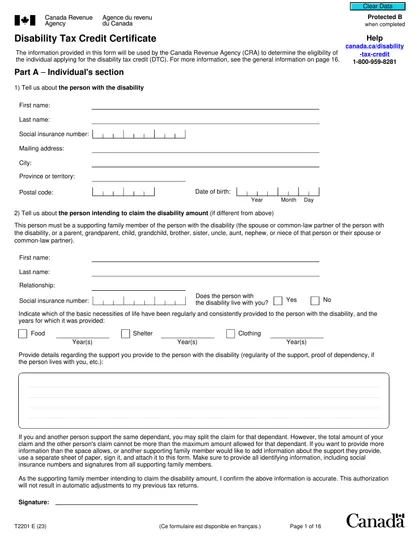
What is Form T2201?
Form T2201, known as the Disability Tax Credit Certificate, is a key document for identifying whether you or a dependent has a significant and ongoing impairment in physical or mental functions. This form is essential for applying for the Disability Tax Credit (DTC), which can lower your income tax burden. To complete the form, you need to fill it out alongside a qualified medical practitioner, then submit it to the Canada Revenue Agency (CRA) for assessment. If approved, you can access the DTC and possibly other related tax credits and benefits.
What is Form T2201 used for?
Form T2201 is important for individuals with disabilities or their dependants. It serves the following purposes:
- Eligibility Determination: Assess if someone has a serious and lasting impairment.
- Tax Credit Claim: Claim the Disability Tax Credit (DTC), which can reduce your taxes.
- Other Benefits: Qualify for benefits like the Registered Disability Savings Plan (RDSP) and Child Disability Benefit (CDB).
- Backdated Claims: Request DTC amounts for earlier years if the disability has been ongoing.
How to fill out Form T2201?
Fill out Part A: Provide your personal information or that of the dependant.
Authorize CRA Contact: Give consent for the CRA to contact your medical professional.
Medical Practitioner Completes Part B: Your medical practitioner will fill out this section with the confirmation number from Part A.
Submit Completed Form: Ensure all sections are accurately filled before sending it to the CRA. It is advisable to keep a copy of your application for future reference.
Check Application Status: Use the CRA's progress tracker to monitor your application.
Who is required to fill out Form T2201?
Form T2201 must be completed by two parties: the individual or claimant who provides personal information in Part A, and a qualified medical practitioner who certifies the impairment in Part B.
After submission, the CRA assesses the information to determine eligibility for the Disability Tax Credit and notifies the individual about potential retroactive tax credits.
When is Form T2201 not required?
Form T2201 is not required for individuals who do not qualify for the Disability Tax Credit. This includes those whose impairments do not meet the severe and prolonged criteria, or those with income above the set thresholds. Additionally, if someone else claims the credit on their behalf, they do not need to submit Form T2201.
When is Form T2201 due?
The deadline for Form T2201 is anytime during the year. However, it’s recommended to submit it before you file your annual tax return to prevent any delays. The Canada Revenue Agency (CRA) generally processes these applications within 8 weeks, but this may take longer if any information is missing.
How to get a blank Form T2201?
To get a blank Form T2201, visit our website. The Canada Revenue Agency issues this form, and we have a blank version pre-loaded in our editor for you to fill out. Remember, our platform helps with filling and downloading but does not support filing forms.
How to sign Form T2201 online?
To sign the T2201 Disability Tax Credit Certificate, you can create an electronic signature using CookPDF. This can include typing your name in the signature block or adding a scanned image of your handwritten signature. Alternatively, you may also sign the form by hand, in accordance with CRA requirements. Remember to check for the latest updates on signature requirements. After filling out the form with CookPDF, download it for your records, but note that submission must be done through other means.
Where to file Form T2201?
You can submit Form T2201 online using the CRA's My Account or Represent a Client portals. Use the "Submit Documents" tool for secure submission.
If you prefer, mail your completed form to a CRA Tax Centre. Make sure to keep a copy for your records and check for the nearest center for accurate mailing.
Frequently asked questions
Fill Out Form T2201 Online in 2026
Download Form