
Fill Out Form T2033 Online in 2026
Transfer your registered retirement savings to another plan
Get Form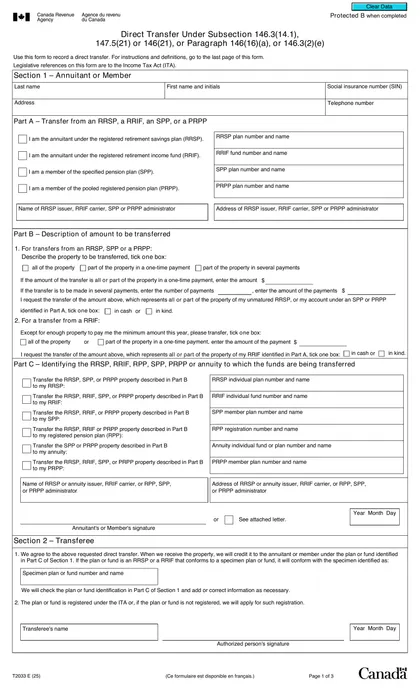
This site is not affiliated with any government, tax, or other official agency. Form last updated: 07/2026. Please verify you are using the current, correct version for your situation before submitting it.
How it works
1. Open the form
Access the pre-loaded form directly in our PDF editor. No need to upload anything!
2. Fill in your details
Carefully complete all required fields to ensure accuracy and validity.
3. Download as PDF
Save your filled-out form in PDF format, ready for submission or other needs.
What is Form T2033?
Form T2033 is essential for individuals transferring assets from a Registered Retirement Savings Plan (RRSP) or Registered Retirement Income Fund (RRIF) to another RRSP, RRIF, or for buying an eligible annuity. This form ensures the transfer complies with tax regulations, preserving the tax advantages associated with these retirement accounts. It requires information about the transferor, transferee, and the specific properties being transferred. Filling it out accurately is crucial to avoid potential tax implications and maintain the integrity of your retirement savings.
What is Form T2033 used for?
Form T2033 is essential for managing your retirement savings. Here's what it's used for:
- Direct Transfer of RRSP or RRIF Assets: Transfers funds from one RRSP or RRIF to another or to buy an eligible annuity.
- Tax-Deferred Transfers: Allows transfers without triggering immediate taxes.
- Record Keeping: Documents transfer details, including personal and account information.
How to fill out Form T2033?
Identify the Transfer Type: Determine if your transfer is under subsection 146.3(14.1), 147.5(21), or 146(21), or paragraph 146(16)(a) or 146.3(2)(e).
Fill Out Section I: Complete your last name, first name, initials, social insurance number, address, and telephone number.
Specify the Plan: Indicate whether transferring from an RRSP, RRIF, SPP, or PRPP, and provide the relevant plan numbers and names.
Provide Issuer Information: Include the name and address of the RRSP issuer, RRIF carrier, SPP, or PRPP administrator, if applicable.
Review and Confirm: Check that all information is accurate and complete before downloading the form.
Who is required to fill out Form T2033?
Form T2033 is completed by three groups: the individual (annuitant), the transferor (administrator or issuer of the plan), and the transferee (administrator or issuer of the plan to whom the amount is transferred).
Individuals looking to transfer property from an RRSP or RRIF to another RRSP or RRIF, or to purchase an eligible annuity, are required to fill out Form T2033.
When is Form T2033 not required?
Form T2033 is not required for transfers that do not involve RRSPs or RRIFs, including those to a Registered Pension Plan (RPP), Simplified Pension Plan (SPP), Pooled Registered Pension Plan (PRPP), or Asset-Linked Deposit Account (ALDA). Additionally, if the transfer consists of an eligible portion of a retiring allowance accompanied by an NR4 slip, you do not need to complete this form.
When is Form T2033 due?
The deadline for Form T2033 is when you transfer funds from a Registered Retirement Savings Plan (RRSP) or Registered Retirement Income Fund (RRIF) to another RRSP, RRIF, or to purchase an eligible annuity. This form must be completed to meet tax regulations and maintain proper records of the transfer.
How to get a blank Form T2033?
To get a blank Form T2033, simply visit our platform. The Canada Revenue Agency issues this form, and we have a blank version ready for you to fill out in our editor. Remember, CookPDF assists in filling and downloading forms, but not filing them.
How to sign Form T2033?
To sign the T2033 form for Direct Transfer, you should use a handwritten signature, as official sources do not indicate the acceptance of electronic or digital signatures. After filling out the form using CookPDF’s tools, remember to download it for your records. Always check for the latest updates regarding tax forms and their requirements to ensure compliance. CookPDF helps you prepare the form, but submission must be done separately.
Where to file Form T2033?
To submit the T2033 form, send it to your old trustee or issuer, or directly to the Canada Revenue Agency (CRA). Remember, it can't be filed online.
Ensure all required signatures are in place and review the form for any mistakes before mailing it. This will help avoid delays in processing.
Frequently asked questions
Fill Out Form T2033 Online in 2026
Download Form