
This site is not affiliated with any government, tax, or other official agency. Form last updated: 07/2026. Please verify you are using the current, correct version for your situation before submitting it.
How it works
1. Open the form
Access the pre-loaded form directly in our PDF editor. No need to upload anything!
2. Fill in your details
Carefully complete all required fields to ensure accuracy and validity.
3. Download as PDF
Save your filled-out form in PDF format, ready for submission or other needs.
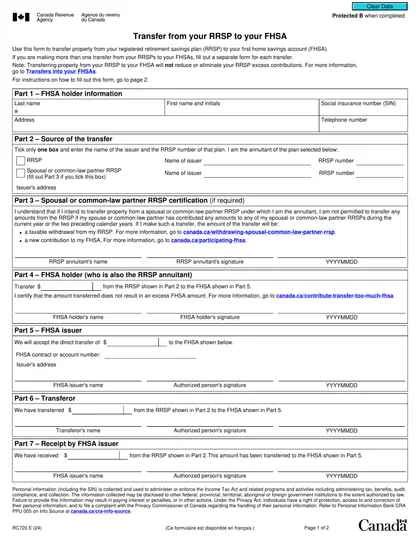
What is Form RC720?
Form RC720, Transfer from Your RRSP to Your FHSA, is designed to facilitate the direct transfer of funds from a Registered Retirement Savings Plan (RRSP) to a First Home Savings Account (FHSA). This form is crucial as it allows you to move money without facing immediate tax liabilities, provided the transfer stays within your FHSA's unused participation limit. By completing this form accurately, you can ensure the transfer is processed correctly, helping you effectively manage your savings for purchasing your first home.
What is Form RC720 used for?
Form RC720 has a specific purpose in managing your retirement savings. Here's what it does:
- Facilitates direct transfers from RRSPs to FHSAs.
- Reduces unused FHSA participation room.
- Avoids immediate tax consequences if within the participation room.
- Ensures the transfer is completed without withholding taxes.
- Provides a record of the transaction for tax purposes.
How to fill out Form RC720?
Open Form RC720 in the PDF editor.
Fill out the required information.
Specify the transfer amount, ensuring it does not exceed your unused FHSA participation room.
Provide the completed form to your financial institution.
The financial institution will complete the direct transfer.
Who is required to fill out Form RC720?
Individuals with a Registered Retirement Savings Plan (RRSP) intending to transfer funds to a First Home Savings Account (FHSA) are responsible for completing Form RC720.
After filling out Form RC720, individuals present it to their financial institution to initiate the transfer process, which adjusts their FHSA participation room accordingly.
When is Form RC720 not required?
Form RC720 is not required if you withdraw funds from your RRSP and contribute them directly to your FHSA. This action counts as a non-direct transfer. In this case, you treat the withdrawal as RRSP income and claim the contribution as an FHSA deduction instead.
When is Form RC720 due?
The deadline for Form RC720 is flexible since it does not have a specific due date. You can submit it anytime, as long as the transfer amount stays within your unused FHSA participation room. Just fill out the form and send it to your financial institution to initiate the transfer.
How to get a blank Form RC720?
To get a blank Form RC720, simply visit our website. The Canada Revenue Agency issues this form, and we have a blank version ready for you to fill out in our editor. Remember, CookPDF aids in filling and downloading, but not filing forms.
How to sign Form RC720 online?
To sign Form RC720, you can use a handwritten signature or a digital signature. After filling out the form with CookPDF, you can download it for your records. Remember to check for any updates regarding the form to ensure compliance. Note that CookPDF does not support submission of the form.
Where to file Form RC720?
To submit Form RC720, print the completed form and sign it. Ensure all fields are accurately filled out before proceeding.
Mail the signed form to the address provided by your financial institution, as online submission is not permitted.
Frequently asked questions
Fill Out Form RC720 Online in 2026
Download Form