
This site is not affiliated with any government, tax, or other official agency. Form last updated: 07/2026. Please verify you are using the current, correct version for your situation before submitting it.
How it works
1. Open the form
Access the pre-loaded form directly in our PDF editor. No need to upload anything!
2. Fill in your details
Carefully complete all required fields to ensure accuracy and validity.
3. Download as PDF
Save your filled-out form in PDF format, ready for submission or other needs.
What is Form RC65 ?
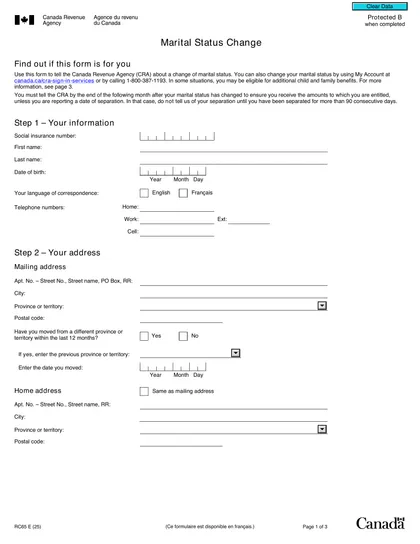
Form RC65, Marital Status Change, is an important document for notifying the Canada Revenue Agency (CRA) about changes in your marital status, such as marriage, divorce, or entering a common-law relationship. Reporting these changes is crucial as it allows the CRA to adjust your child and family benefits accordingly, ensuring you receive the correct payments. Not updating your marital status can lead to penalties or interest, making it essential to fill out this form promptly. You can submit it online through MyCRA or by mail.
What is Form RC65 used for?
Form RC65 is important for keeping your tax information up to date. Here's what it's used for:
- Notify the CRA of a marital status change.
- Update information for tax filing.
- Determine eligibility for government benefits and credits.
- Recalculate benefits and credit payments based on updated family net income and other factors.
- Ensure accurate tax obligations and credits.
How to fill out Form RC65 ?
Enter your name, phone numbers, and Social Insurance Number (SIN).
Select your new marital status and provide the date of change.
If applicable, add your partner's name, SIN, and address (if different).
Verify that all information is correct and complete.
Who is required to fill out Form RC65 ?
Individuals who have undergone a change in their marital status, such as marriage, divorce, separation, or widowhood, are responsible for completing Form RC65. This ensures the Canada Revenue Agency's records are updated accordingly.
Form RC65 is required for those who need to notify the CRA about their marital status change, which is crucial for eligibility for various tax credits and benefits.
When is Form RC65 not required?
Form RC65, Marital Status Change, isn't required when there is no change in marital status. If individuals live together and share financial responsibilities without a relationship breakdown, they don't need to file this form. The CRA generally does not recognize a separation in these situations, so keep that in mind when determining if you need to submit Form RC65.
When is Form RC65 due?
The deadline for Form RC65 is the end of the month following the month your marital status changed. For instance, if your status changed in April, you must submit the form by May 31st. Timely submission ensures accurate benefits and tax calculations.
How to get a blank Form RC65 ?
To get a blank Form RC65, Marital Status Change, visit our platform, where the Canada Revenue Agency issues this form. You can fill it out right away without needing to download a separate template. Remember, our website helps with filling and downloading but not filing forms.
How to sign Form RC65 online?
To sign Form RC65, Marital Status Change, a handwritten signature is required. After filling out the necessary fields using CookPDF, you can download the completed form for your records. Remember to check for any updates regarding this form on official sources to ensure you have the latest information. CookPDF is here to help you with form completion, but submission must be done through other means.
Where to file Form RC65 ?
To submit Form RC65, you can file it by mail or fax to your local tax centre. Make sure to include any necessary supporting documents with your submission.
Alternatively, you can update your marital status using the MyCRA or MyBenefits CRA mobile app. Remember, online submission is not available for this form.
Frequently asked questions
Fill Out Form RC65 Online in 2026
Download Form