
This site is not affiliated with any government, tax, or other official agency. Form last updated: 07/2026. Please verify you are using the current, correct version for your situation before submitting it.
How it works
1. Open the form
Access the pre-loaded form directly in our PDF editor. No need to upload anything!
2. Fill in your details
Carefully complete all required fields to ensure accuracy and validity.
3. Download as PDF
Save your filled-out form in PDF format, ready for submission or other needs.
What is Form AUT-01?
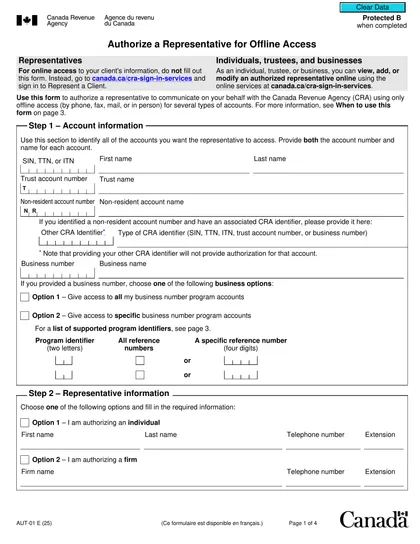
Form AUT-01, Authorize a Representative for Offline Access, is a Canadian document that allows you to grant permission to a trusted individual to manage your Canada Revenue Agency (CRA) accounts. This access is not online; instead, it enables your representative to communicate through phone, fax, mail, or in person. By using this form, you ensure that only authorized people can handle your tax information offline, making it a secure option for managing your tax affairs when you are unavailable.
What is Form AUT-01 used for?
Form AUT-01 is an important tool for managing your tax affairs. Here's what it does:
- Authorize a representative to access your tax and benefit information through phone, fax, mail, or in person.
- Grant offline access to various accounts, including individual tax, trust, non-resident, and business number program accounts.
- Ensure only authorized representatives can communicate with the CRA on your behalf.
How to fill out Form AUT-01?
Identify Accounts: Specify the accounts your representative will access (individual tax, trust, non-resident, business number program).
Provide Representative Information: Fill in the representative's details, including name, phone number, and extension for individuals or firm name, phone number, and extension for firms.
Choose Access Options: Select how your representative can access information (phone, fax, mail, in person).
Submit the Form: Send the completed form to the appropriate CRA tax centre within six months of signing.
Who is required to fill out Form AUT-01?
Individuals and businesses, including registered charities, are responsible for completing Form AUT-01. This form allows them to authorize a representative to communicate with the Canada Revenue Agency (CRA) through offline methods.
Taxpayers and their representatives use Form AUT-01 to protect access to tax information, ensuring only authorized individuals communicate with the CRA. This is vital for managing financial and tax matters securely.
When is Form AUT-01 not required?
Form AUT-01 is not required for individuals or businesses using the CRA My Business Account system for authorization. This system employs a different method for managing communications. Additionally, if you do not need to contact the CRA offline — such as by phone, fax, mail, or in-person — you can skip this form entirely.
When is Form AUT-01 due?
The deadline for Form AUT-01 is six months from the date you sign it. Make sure to send it to the CRA tax centre within this timeframe to ensure your representative can access your tax information.
How to get a blank Form AUT-01?
To access a blank Form T5018, head over to our CookPDF site — home to official forms from the Canada Revenue Agency. The form is preloaded in our online editor for easy completion. Please note: our platform supports filling out and downloading forms, but does not handle their submission.
How to sign Form AUT-01 online?
To sign Form AUT-01, Authorize a Representative for Offline Access, you need to provide a handwritten signature. After filling out the form using CookPDF’s editing tools, you can download it for your records. Remember to check for any updates or changes to the form requirements before submission, as CookPDF does not handle this process.
Where to file Form AUT-01?
To submit Form AUT-01, mail the completed and signed form to the Sudbury Tax Centre within six months of signing it.
Alternatively, you can authorize representatives for offline access by fax, by phone, or in person.
Frequently asked questions
Fill Out Form AUT-01 Online in 2026
Download Form