
This site is not affiliated with any government, tax, or other official agency. Form last updated: 07/2026. Please verify you are using the current, correct version for your situation before submitting it.
How it works
1. Open the form
Access the pre-loaded form directly in our PDF editor. No need to upload anything!
2. Fill in your details
Carefully complete all required fields to ensure accuracy and validity.
3. Download as PDF
Save your filled-out form in PDF format, ready for submission or other needs.
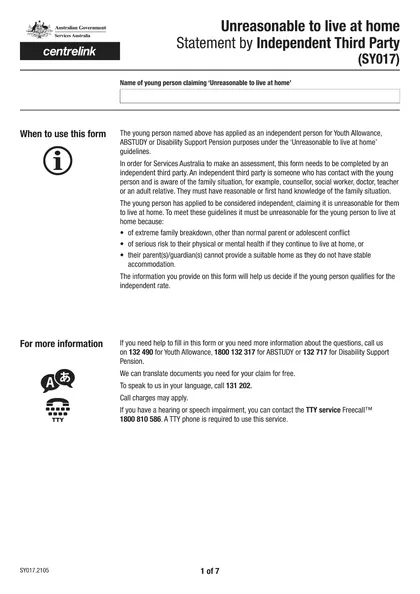
What is Form SY017?
The SY017 form, known as the "Unreasonable to live at home statement by independent third party," is designed to clarify why a young person cannot safely reside with their family. It plays a crucial role in assisting Centrelink, the Australian government agency, in evaluating the circumstances of individuals applying for Youth Allowance or ABSTUDY. This form must be completed by an independent third party, such as a teacher or social worker, who can attest to severe family issues or other factors that make it unsafe for the young person to live at home.
What is Form SY017 used for?
Form SY017 is important for young people applying for financial support. It serves the following purposes:
- Comment on Family Situation: Provides details about a young person's family when applying for Youth Allowance or ABSTUDY.
- Assessment Support: Assists Services Australia in evaluating the young person's living arrangements.
- Independent Third Party Input: Collects insights from individuals familiar with the young person’s family situation, like counselors or teachers.
How to fill out Form SY017?
Fill out the SY017 form with clear reasons why it's unreasonable for the young person to live at home.
Ensure an independent third party completes the form, knowledgeable about the family situation.
Download the filled form once complete.
Submit the form to Services Australia for processing.
Who is required to fill out Form SY017?
Form SY017 is typically filled out by a parent or guardian of a young person applying for Youth Allowance or ABSTUDY. It captures a third-party perspective on family circumstances.
Centerlink uses this form to evaluate the young person's living situation, helping determine their eligibility for financial assistance.
When is Form SY017 not required?
Form SY017 is not required when a young person's family situation allows for reasonable living at home, such as normal parent-child relationships or no extreme family breakdown. Additionally, if the young person is not applying for Youth Allowance or ABSTUDY, submitting this form is unnecessary.
When is Form SY017 due?
The deadline for Form SY017 is when a young person is applying for Youth Allowance or ABSTUDY. This form must be submitted along with the application to provide an independent third party's comments on the family situation. Make sure to complete it in time to avoid delays in your application.
How to get a blank Form SY017?
To get a blank Form SY017 issued by Services Australia, simply visit our platform. The form is pre-loaded in our editor, so you can fill it out directly. Remember, CookPDF assists with filling and downloading forms, but not filing them.
How to sign Form SY017 online?
To sign the Unreasonable to Live at Home Statement by Independent Third Party form (SY017), you can use an electronic signature, which is legally binding under Australian law. CookPDF allows you to create a simple electronic signature for your form. Remember to check for the latest updates regarding signing requirements. Once completed, download your form and proceed with any necessary steps outside of CookPDF for submission.
Where to file Form SY017?
You can submit form SY017 online by following Services Australia's guidelines. Ensure you use electronic signatures where permitted.
Alternatively, you can mail the completed form to the appropriate authorities. Remember to include all required information and sign and date the form.
Frequently asked questions
Fill Out Form SY017 Online in 2026
Download Form