
Fill Out Form NAT 73657 Online in 2026
Create tax invoices for your business and clients online.
Get Form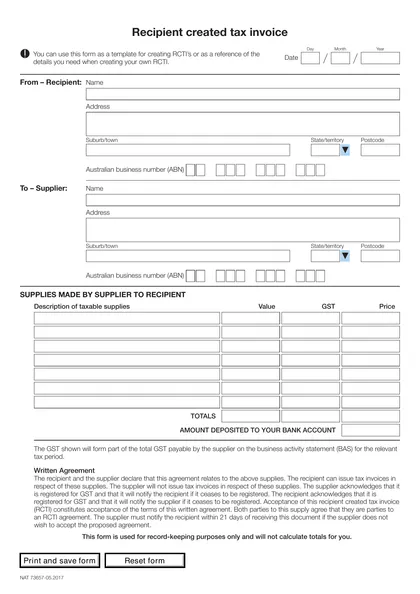
This site is not affiliated with any government, tax, or other official agency. Form last updated: 07/2026. Please verify you are using the current, correct version for your situation before submitting it.
How it works
1. Open the form
Access the pre-loaded form directly in our PDF editor. No need to upload anything!
2. Fill in your details
Carefully complete all required fields to ensure accuracy and validity.
3. Download as PDF
Save your filled-out form in PDF format, ready for submission or other needs.
What is Form NAT 73657?
The Recipient-created tax invoices form (NAT 73657) is designed for Australian businesses that need to issue tax invoices when the recipient of goods or services takes on that responsibility. This form is crucial for complying with GST regulations, helping businesses accurately record and report tax credits. It is particularly relevant in scenarios such as government grants and trade-in contracts, ensuring proper record-keeping and adherence to tax laws. Understanding this form is essential for maintaining compliance and efficient financial management.
What is Form NAT 73657 used for?
Form NAT 73657 is important for businesses dealing with GST and invoicing. Here’s what it’s used for:
- GST Credit Claiming: Helps businesses claim GST credits, lowering GST owed to the ATO.
- Accurate Invoicing: Allows recipients to create tax invoices in specific situations, ensuring compliance.
- Compliance with ATO Requirements: Meets ATO criteria for issuing these invoices, requiring a written agreement between supplier and recipient.
How to fill out Form NAT 73657?
Fill in the date, including day, month, and year.
Enter the supplier and recipient's ABN, name, address, suburb/town, postcode, and state/territory.
List the taxable supplies provided by the supplier to the recipient.
Calculate the GST amount and include it in the form.
Attach a written agreement confirming GST registration status and obligations.
Retain the original or a copy of the RCTI for five years.
Who is required to fill out Form NAT 73657?
GST-registered businesses are responsible for completing the Recipient-created tax invoices (NAT 73657) form. Both the supplier and recipient must provide details about taxable supplies, GST, and their written agreement.
After completion, GST-registered businesses use this form for record-keeping, retaining it for 5 years to comply with tax laws.
When is Form NAT 73657 not required?
Form NAT 73657 is not required when the supplier issues a standard tax invoice. Also, individuals or small businesses not registered for GST do not need to use this form. For RCTIs to apply, both parties must be GST-registered and have a written agreement in place.
When is Form NAT 73657 due?
The deadline for Form NAT 73657 is not fixed. This form serves as a template for creating recipient-created tax invoices (RCTIs) and should be kept for at least five years for record-keeping in line with GST regulations. Make sure to complete and store it properly within this timeframe.
How to get a blank Form NAT 73657?
To get a blank Form NAT 73657, simply visit our website. The Australian Taxation Office provides this form, and we have it pre-loaded in our editor for you to fill out. Remember, our platform helps with filling and downloading but does not support filing the forms.
Do you need to sign Form NAT 73657?
No, you do not need to sign Recipient-created tax invoices. According to the Australian Taxation Office, these documents are issued by the recipient of a taxable supply and must meet specific requirements under the A New Tax System (Goods and Services Tax) Act 1999. For the most accurate information, it's always best to check for the latest updates from the ATO. Use CookPDF to fill out and download your form, but remember, we do not support submission.
Where to file Form NAT 73657?
Recipient-created tax invoices (RCTIs) must be submitted to the Australian Taxation Office (ATO). You can file them online via the ATO's digital services or send them by mail.
For online submission, visit the ATO's official website. If mailing, refer to the address listed on their site. Ensure all required details are completed.
Frequently asked questions
Fill Out Form NAT 73657 Online in 2026
Download Form