
This site is not affiliated with any government, tax, or other official agency. Form last updated: 07/2026. Please verify you are using the current, correct version for your situation before submitting it.
How it works
1. Open the form
Access the pre-loaded form directly in our PDF editor. No need to upload anything!
2. Fill in your details
Carefully complete all required fields to ensure accuracy and validity.
3. Download as PDF
Save your filled-out form in PDF format, ready for submission or other needs.
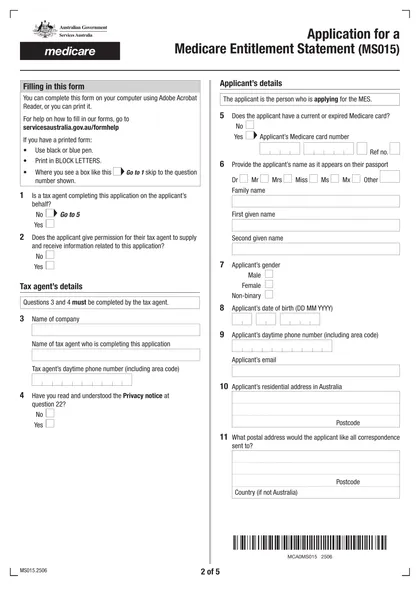
What is Form MS015?
The Application for a Medicare Entitlement Statement (MS015) is a crucial form for individuals claiming an exemption from the Medicare levy. If you are not eligible for Medicare, this statement serves as proof that you do not have coverage. By providing information about your residency, health insurance, and other relevant details, the form supports your income tax return process. Completing the MS015 accurately ensures that you avoid paying the Medicare levy when you are not entitled to Medicare benefits.
What is Form MS015 used for?
Form MS015 is important for managing your Medicare status. Here’s what it’s used for:
- Claiming Exemption from Medicare Levy: Request exemption if you weren’t eligible for Medicare during a past financial year.
- Providing Information for Tax Returns: Give a Medicare Entitlement Statement to the ATO when applying for a Medicare levy exemption in your tax return.
- Documenting Residency Status: Report changes in residency, like leaving Australia permanently or having a different mailing address than your home address.
How to fill out Form MS015?
Input your personal information, including name, address, and contact details.
Provide any required financial information as prompted.
Complete additional sections that apply to your situation.
Review all entered information for accuracy before finalizing.
Download the completed form for submission via the specified method.
Who is required to fill out Form MS015?
Individuals claiming exemption from the Medicare levy are responsible for completing Form MS015. Tax agents may also fill it out on behalf of their clients if authorized.
The form is used by individuals to provide proof of eligibility for a Medicare Entitlement Statement, which the ATO uses to verify details and assess levy exemptions.
When is Form MS015 not required?
You do not need Form MS015 if you are already eligible for Medicare benefits or possess a Medicare Entitlement Statement confirming your eligibility during the relevant period. Additionally, individuals with dependants who are also eligible for Medicare benefits do not need to submit this form.
When is Form MS015 due?
The deadline for Form MS015 is when you need to claim an exemption from the Medicare levy. If you were not eligible for Medicare in a previous financial year and want to claim this exemption on your tax return, you should apply for the form during that year.
How to get a blank Form MS015?
To get a blank Form MS015, simply visit our platform. A pre-loaded version of the form is ready for you to fill out. Remember, CookPDF aids in filling and downloading forms, but does not support filing them.
How to sign Form MS015 online?
To sign the Application for a Medicare Entitlement Statement (MS015) accurately, you can create a simple electronic signature that meets industry requirements. CookPDF allows you to fill out the form and add your electronic signature before downloading it for your records. Always check for the latest updates related to the form to ensure compliance, as CookPDF does not support submission. For further processing, follow the necessary steps outside of our platform.
Where to file Form MS015?
You can submit the MS015 form online via your myGov account or by email. To email, attach the completed PDF and send it to [email protected].
Make sure your file isn't password protected and is under 5MB. You also have the option to mail the application to the Medicare Entitlement Statement Unit if needed.
Frequently asked questions
Fill Out Form MS015 Online in 2026
Download Form