
Fill Out Form MS011 Online in 2026
Transfer your Medicare details to a new card easily in 2026
Get Form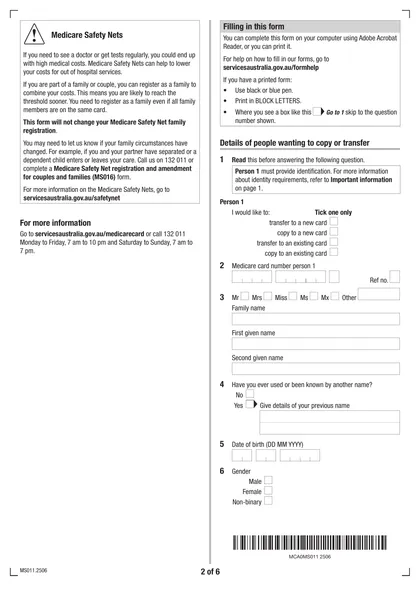
This site is not affiliated with any government, tax, or other official agency. Form last updated: 07/2026. Please verify you are using the current, correct version for your situation before submitting it.
How it works
1. Open the form
Access the pre-loaded form directly in our PDF editor. No need to upload anything!
2. Fill in your details
Carefully complete all required fields to ensure accuracy and validity.
3. Download as PDF
Save your filled-out form in PDF format, ready for submission or other needs.
What is Form MS011?
The Application to copy or transfer from one Medicare card to another form (MS011) is essential for updating the individuals listed on your Medicare card. This form allows you to add someone, transfer your card to another person, or create a new card with the same details. Filling out this form correctly is important as it ensures that the appropriate individuals have access to your Medicare benefits, which is vital for healthcare services and claims. Remember to complete it, sign it, and send it along with the required documents to make the necessary updates.
What is Form MS011 used for?
Form MS011 is used for managing Medicare card details. Here’s what it can help you with:
- Transfer to a new Medicare card: Moves your details to a new card, deactivating the old one.
- Copy to a new Medicare card: Adds you to a new card while keeping you active on the old one.
- Transfer to an existing Medicare card: Transfers your details to an existing card, deactivating the old one.
- Copy to an existing Medicare card: Adds you to an existing card while keeping you active on the old one.
How to fill out Form MS011?
Fill in your personal information, including name, address, and contact details.
Provide details about the relevant event or situation.
Attach any required documents to support your application.
Double-check all entries for accuracy and completeness.
Download the completed form for your records.
Who is required to fill out Form MS011?
Individuals responsible for completing Form MS011 include those who need to transfer or copy Medicare card details, such as changing names or adding someone to a card. Both the applicant and the cardholder must sign the form if it's for another person's card.
This form is used by individuals managing their Medicare cards, including those who have moved or changed their names.
When is Form MS011 not required?
Form MS011 isn't required for children under 15, as they’re automatically covered on their parents' Medicare card. Additionally, if you already possess your own Medicare card and don’t need to transfer or copy it, you do not need to complete this form.
When is Form MS011 due?
The deadline for Form MS011 is flexible. You can submit it at any time, but make sure it is completed and signed by all necessary parties before sending it to Services Australia. Don’t forget to include your identification and any supporting documents with the form.
How to get a blank Form MS011?
To get a blank Form MS011, simply visit our website. The form, issued by Services Australia. You’ll find the form pre-loaded in our editor, ready for you to fill out. Remember, CookPDF helps with filling and downloading forms, but we do not support filing them.
How to sign Form MS011 online?
To complete the Application to copy or transfer from one Medicare card to another (MS011), you can sign it with a legible handwritten signature that includes your first and last name, along with any relevant credentials. While CookPDF allows you to fill out the form and create a simple electronic signature, remember that electronic signatures may not be accepted. Always check for the latest updates on signing requirements. After filling out the form, download it for your records, as CookPDF does not support submission.
Where to file Form MS011?
You can file the Application to transfer from one Medicare card to another (MS011) online via the Medicare website or the Express Plus Medicare app with a linked myGov account.
If you don't have a myGov account, download the form, complete it, and mail it with the required documents. Ensure the cardholder signs the form if transferring to another person's card.
Frequently asked questions
Fill Out Form MS011 Online in 2026
Download Form