
This site is not affiliated with any government, tax, or other official agency. Form last updated: 07/2026. Please verify you are using the current, correct version for your situation before submitting it.
How it works
1. Open the form
Access the pre-loaded form directly in our PDF editor. No need to upload anything!
2. Fill in your details
Carefully complete all required fields to ensure accuracy and validity.
3. Download as PDF
Save your filled-out form in PDF format, ready for submission or other needs.
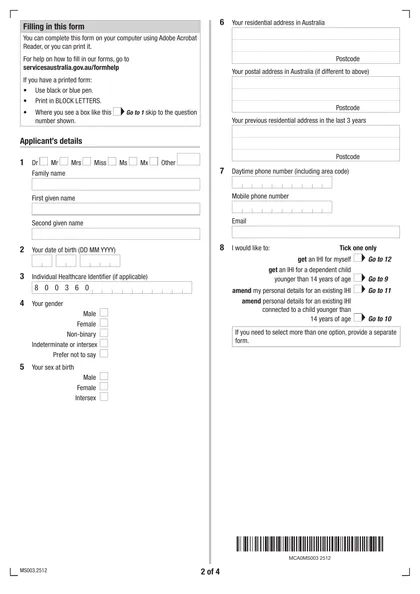
What is Form MS003?
The Request an Individual Healthcare Identifier form (MS003) is designed to obtain a unique 16-digit Individual Healthcare Identifier (IHI). This identifier is crucial for accurately matching your health records, facilitating better communication between healthcare providers like doctors and hospitals. For individuals who do not qualify for Medicare or DVA benefits, having an IHI allows for the creation of a My Health Record, where immunization history can be uploaded, enhancing access to essential medical information. While filling out this form is not mandatory, it significantly aids in streamlining healthcare services.
What is Form MS003 used for?
Form MS003 is essential for managing healthcare identifiers in Australia. Here’s what it can do for you:
- Request an Individual Healthcare Identifier (IHI) for individuals or dependent children under 14 who are not eligible for Medicare or a pension from the Department of Veterans’ Affairs.
- Notify the Healthcare Identifiers Service of a person’s death.
- Amend personal details for individuals with an existing IHI.
How to fill out Form MS003?
Complete the necessary fields in the MS003 form.
Attach certified copies of your evidence of identity.
Download the filled form for your records.
Submit the form via your myGov account or through email, fax, or post.
Who is required to fill out Form MS003?
Individuals aged 14 and over, along with parents or guardians for dependent children, are responsible for completing Form MS003. This is necessary for registering or updating details for an Individual Healthcare Identifier (IHI).
Healthcare providers use Form MS003 to identify patients and access their records in the My Health Record system, ensuring accurate communication and management of health information.
When is Form MS003 not required?
You don’t need Form MS003 if you are already eligible for Medicare or receive a pension or benefit from the Australian government. Additionally, individuals under 14 years old who do not qualify for Medicare or a pension/benefit also don’t require this form.
When is Form MS003 due?
The deadline for Form MS003 is flexible. You can submit it at any time to request an Individual Healthcare Identifier (IHI). Complete the form online via your myGov account or download it to fill out manually. After completing, submit it to Services Australia for processing.
How to get a blank Form MS003?
To get a blank Form MS003, simply visit our website where we have the form pre-loaded in our editor. You can fill it out and download it for your records. Remember, CookPDF aids in filling and downloading but not filing forms.
How to sign Form MS003 online?
To sign the Request an Individual Healthcare Identifier form (MS003), use a handwritten signature, as official guidelines do not mention electronic or digital signatures for this document. After completing the form using CookPDF, remember to download it for your records. Always check for the latest updates to ensure compliance with current requirements. Keep in mind that CookPDF does not facilitate form submission, so take care of that step separately.
Where to file Form MS003?
To submit the Request an Individual Healthcare Identifier form (MS003), print the completed form. Sign it using a black or blue pen, ensuring your details are clear.
Mail the signed form to the appropriate address. Remember, online submission is not available for this form, so a physical copy is necessary.
Frequently asked questions
Fill Out Form MS003 Online in 2026
Download Form