
This site is not affiliated with any government, tax, or other official agency. Form last updated: 07/2026. Please verify you are using the current, correct version for your situation before submitting it.
How it works
1. Open the form
Access the pre-loaded form directly in our PDF editor. No need to upload anything!
2. Fill in your details
Carefully complete all required fields to ensure accuracy and validity.
3. Download as PDF
Save your filled-out form in PDF format, ready for submission or other needs.
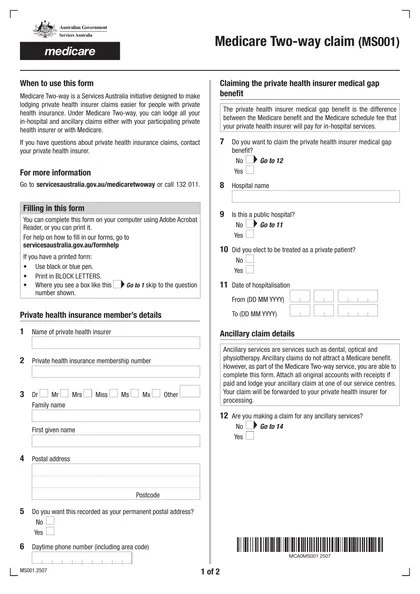
What is Form MS001?
The Medicare Two-way claim form (MS001) helps individuals with private health insurance claim their healthcare costs more efficiently. This form is used for lodging both in-hospital and ancillary claims, such as dental or optical services, either with your private health insurer or directly with Medicare. By using this form, healthcare providers receive timely and accurate payments, making the reimbursement process smoother for everyone. It plays a crucial role in simplifying the claims process, ensuring you receive the medical benefits you are entitled to.
What is Form MS001 used for?
The Medicare Two-way claim form (MS001) is an important tool for managing healthcare costs. It serves several key purposes:
- Submit in-hospital and ancillary claims with Medicare and private health funds.
- Facilitate the payment process for healthcare providers.
- Ensure accurate and prompt reimbursement for Medicare claims.
- Claim private health insurer medical gap benefits.
- Document and submit claims for Medicare benefits.
How to fill out Form MS001?
Fill out your personal details: name, address, and date of birth.
Provide information about any relevant medical history or current health conditions.
Attach original accounts with receipts if the accounts have been paid.
Ensure all required questions are answered and the form is dated.
Download the completed form for submission via mail or in-person at a Medicare service center.
Who is required to fill out Form MS001?
The Medicare Two-way claim form (MS001) must be completed by both the healthcare provider and the patient. The provider submits the claim for in-hospital and ancillary services, while the patient fills in personal details and insurance information.
After submission, the patient's private health insurer processes the claim and forwards it to the Department of Human Services for further action.
When is Form MS001 not required?
You don't need Form MS001 if you aren't lodging claims with a private health insurer. It's not required for public hospital claims or services that don’t involve private health insurance, like public dental services. Additionally, individuals without private health insurance are exempt from using this form.
When is Form MS001 due?
The deadline for Form MS001 is 12 months after the date when the services were provided. If you miss this deadline, Medicare may not pay its share of the claim. You can check the status of your claim through your Medicare Summary Notice, secure Medicare account, or your plan's claims statements.
How to get a blank Form MS001?
To get a blank Form MS001, simply visit our website where a pre-loaded version of the form, issued by the Services Australia, is ready for you to fill out. Remember, CookPDF helps you fill and download forms but does not assist with filing them.
How to sign Form MS001?
To sign Form MS001, you can use a handwritten signature or a simple electronic signature that complies with eSignature regulations. CookPDF allows you to create an electronic signature for forms that accept them. After filling out the form in CookPDF, download it for your records. Remember to check for the latest updates regarding signature requirements before finalizing your submission elsewhere, as CookPDF does not support submission.
Where to file Form MS001?
You can submit the Medicare Two-way claim form (MS001) online via your myGov account linked to Medicare or through the Express Plus Medicare app.
Alternatively, mail the completed form to the Department of Human Services or drop it off at a Medicare service center. Attach images of original accounts and receipts if applicable.
Frequently asked questions
Fill Out Form MS001 Online in 2026
Download Form