
Fill Out Form MOD R Online in 2026
Complete your property details for Australian requirements
Get Form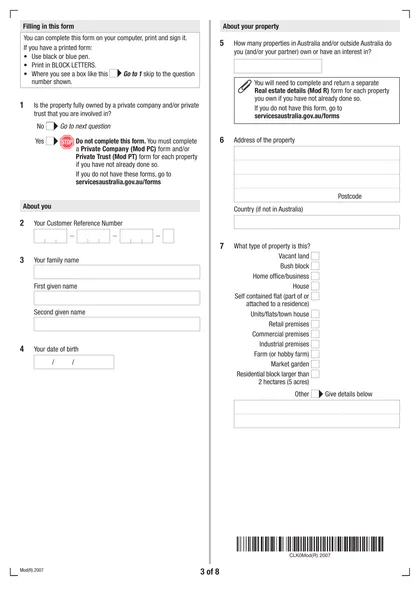
This site is not affiliated with any government, tax, or other official agency. Form last updated: 07/2026. Please verify you are using the current, correct version for your situation before submitting it.
How it works
1. Open the form
Access the pre-loaded form directly in our PDF editor. No need to upload anything!
2. Fill in your details
Carefully complete all required fields to ensure accuracy and validity.
3. Download as PDF
Save your filled-out form in PDF format, ready for submission or other needs.
What is Form MOD R?
The Real Estate Details form, MOD R, is essential for Services Australia to collect information about a property's value and income. This form plays a crucial role in determining how much of the property's worth and earnings are factored into assessing benefits or entitlements. Providing accurate details on this form helps ensure that individuals receive the appropriate support, minimizing potential confusion or delays in their claims. Remember, the form must be signed and submitted, along with supporting documents, either online, via the Express Plus app, or in person at a service center.
What is Form MOD R used for?
Form MOD R is important for real estate transactions. It serves several key purposes:
- Gathering Property Information: Collects essential details about properties, seller's goals, and marketing permissions.
- Transaction Documentation: Provides binding agreements outlining rights and responsibilities of all parties.
- Legal Compliance: Ensures accuracy to avoid disputes, liabilities, and penalties.
- Marketing and Sales: Aids in developing effective marketing strategies based on seller timelines and financial goals.
How to fill out Form MOD R?
Open the Real Estate Details form (MOD R) in the PDF editor.
Fill in all required fields, including your share of the property's asset value and income.
Create an electronic signature if necessary.
Click Done to download the completed form.
Upload the form via your Centrelink online account or the Express Plus Centrelink app.
If unable to upload, submit it at a service centre or by post.
Who is required to fill out Form MOD R?
Individuals with a stake in real estate, including property owners, private companies, and trusts, are responsible for completing Form MOD R.
After completion, the form is used to report real estate details to Centrelink, ensuring accurate asset and income assessments for compliance purposes.
When is Form MOD R not required?
Form MOD R is not required when a property is fully owned by a private trust or company, and the individual is connected to that entity. Additionally, if the property's information is already provided in another submission or if it doesn’t need to be reported to Centrelink, you can skip this form.
When is Form MOD R due?
The deadline for Form MOD R is when you need to report your share of a property's asset value and income to Centrelink. You must submit it with supporting documents. You can upload it online through myGov or the Express Plus Centrelink mobile app, or submit it at a service centre or by post.
How to get a blank Form MOD R?
To get a blank version of the Real Estate Details, Form MOD R, issued by Services Australia, simply visit our website. We have the form pre-loaded in our editor, ready for you to fill out. Remember, our platform helps with filling and downloading forms, but not filing them.
Do you need to sign Form MOD R?
You need to sign Form MOD R manually or electronically before submitting it along with your supporting documents, according to official sources from Services Australia. It’s a good idea to check for any updates regarding this requirement. With CookPDF, you can fill out the form, create a simple electronic signature, and download it for your records. Remember, we don’t assist with submissions, so make sure to take care of that separately.
Where to file Form MOD R?
To submit the Real Estate Details form (MOD R), you can file it online through your Centrelink account linked to myGov or via the Express Plus Centrelink mobile app.
If online submission is not an option, visit a service centre or send it by post. Don't forget to sign your form and include any required supporting documents before you submit.
Frequently asked questions
Fill Out Form MOD R Online in 2026
Download Form