
Fill Out Form MOD F Online in 2026
Understand your obligations for reporting income and expenses
Get Form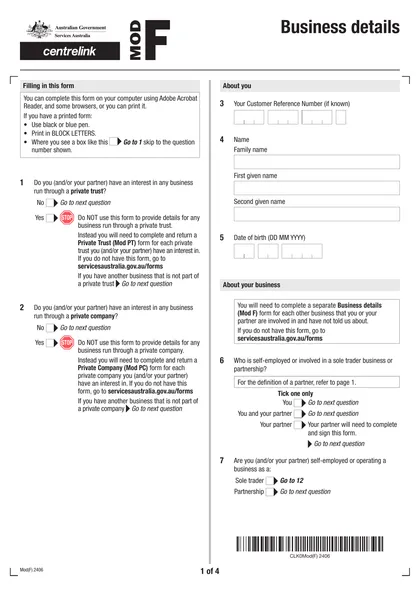
This site is not affiliated with any government, tax, or other official agency. Form last updated: 07/2026. Please verify you are using the current, correct version for your situation before submitting it.
How it works
1. Open the form
Access the pre-loaded form directly in our PDF editor. No need to upload anything!
2. Fill in your details
Carefully complete all required fields to ensure accuracy and validity.
3. Download as PDF
Save your filled-out form in PDF format, ready for submission or other needs.
What is Form MOD F?
The Business Details Form (MOD F) is essential for anyone in Australia who is involved in a business and needs to inform Centrelink about it. If you or your partner have not previously reported your business activities, this form is required. By providing details about your business income and assets, you help Centrelink track changes, such as new contracts or financial statements. This ensures that your records are up-to-date and that you receive the appropriate benefits based on your current situation.
What is Form MOD F used for?
Form MOD F is important for businesses. Here’s what it’s used for:
- Reporting Business Involvement: To let Services Australia know about your or your partner's role in a business.
- Tracking Transactions: To manage and keep records of business-related transactions.
- Compliance: To meet regulatory requirements by sharing necessary business information.
- Legal Binding: To create a legally binding document when completed with an electronic signature.
How to fill out Form MOD F?
Complete the Business Details Form (MOD F) in the PDF editor.
Ensure all required information is filled out accurately.
Attach supporting documents, like personal and business tax returns.
Download the completed form.
Submit through myGov or the Express Plus Centrelink mobile app, or by post if unable to upload.
Who is required to fill out Form MOD F?
Individuals who are self-employed, sole traders, or partners in a business must complete Form MOD F. This includes those who have not previously informed Services Australia of their business activities.
After filling out the form, business owners and partners submit it to Services Australia to report their business involvement. This is vital for accurate tax records and regulatory compliance.
When is Form MOD F not required?
Form MOD F is not required when the personnel of the procurer and contractor operate in the same area. This applies to local suppliers or subsidiaries of out-of-state companies, provided the contracts relate directly to ongoing operations.
When is Form MOD F due?
The deadline for Form MOD F is not specified. You should complete and submit it along with supporting documents as soon as possible. You can upload the form online through myGov or the Express Plus Centrelink mobile app, or submit it at a service centre or by post.
How to get a blank Form MOD F?
To get a blank Form MOD F, simply visit our website. We have a ready-to-fill version of the form issued by Services Australia available in our editor. Remember, our platform aids in filling and downloading but does not support filing forms.
How to sign Form MOD F online?
To ensure your MOD F form is valid, you need an electronic signature that meets legal standards. While CookPDF allows you to create simple electronic signatures for forms, it's important to check the latest updates on requirements. After filling out your form with CookPDF, download it for your records. However, remember that CookPDF does not support form submission, so you'll need to handle that separately.
Where to file Form MOD F?
To submit the Business details form (MOD F), log in to your Centrelink online account linked to myGov or use the Express Plus Centrelink mobile app.
If you can't upload the form online, you can also submit it at a service centre or by post. Check the guidelines for more details on document submission.
Frequently asked questions
Fill Out Form MOD F Online in 2026
Download Form