
Fill out Form 5498-QA Online in 2026
Report your contributions to your ABLE account accurately.
Get Form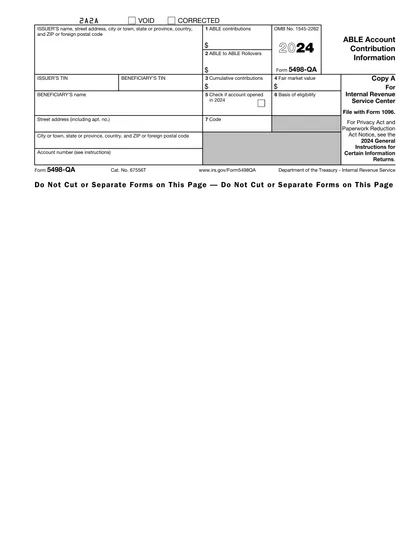
This site is not affiliated with any government, tax, or other official agency. Form last updated: 07/2026. Please verify you are using the current, correct version for your situation before submitting it.
How it works
1. Open the form
Access the pre-loaded form directly in our PDF editor. No need to upload anything!
2. Fill in your details
Carefully complete all required fields to ensure accuracy and validity.
3. Download as PDF
Save your filled-out form in PDF format, ready for submission or other needs.
What is Form 5498-QA?
Form 5498-QA is a tax document that reports contributions to an ABLE (Achieving a Better Life Experience) account. It includes details about all contributions made during the tax year, such as rollovers and direct transfers. This form is crucial for helping the IRS monitor compliance with annual contribution limits, which are $17,000 for most individuals and an additional $13,590 for working beneficiaries. Additionally, it shows the fair market value of the account at the end of the year, assisting account holders in making informed investment choices.
What is Form 5498-QA used for?
Form 5498-QA is an important document for managing your ABLE account. Here’s what it’s used for:
- Reporting Contributions: Informs the IRS about contributions made to your ABLE account.
- Tax Deductions: Provides information that may help you claim tax deductions.
- Account Management: Aids in tracking contributions and ensuring eligibility for tax benefits.
How to fill out Form 5498-QA?
Enter the Beneficiary’s name and Social Security number.
Fill in the account number for the ABLE account.
Indicate the types of contributions made during the tax year.
Complete the total contribution amounts, including cash contributions and rollovers.
Double-check all entered information for accuracy.
Review for any required attachments or additional information.
Who is required to fill out Form 5498-QA?
State agencies or instrumentalities that establish and maintain qualified ABLE programs are responsible for completing Form 5498-QA.
The IRS uses this form to collect information on ABLE account contributions, and beneficiaries receive a copy for their records, which may assist with state tax returns.
When is Form 5498-QA not required?
Form 5498-QA is not required if you made no contributions to an ABLE account during the year. Additionally, if your state or its agency does not maintain a qualified ABLE program, you do not need to file this form with the IRS.
When is Form 5498-QA due?
The deadline for Form 5498-QA is May 31 of the year following the contributions. This form must be filed by an officer or employee of the state or its agency controlling the qualified ABLE program. It reports contributions and fair market value for tax purposes. Make sure to file on time to avoid any issues.
How to get a blank Form 5498-QA?
To obtain a blank Form 5498-QA, simply visit our website. This form is issued by any state or its agency managing a qualified ABLE program and reports contributions and transfers to ABLE accounts. Remember, our platform helps you fill and download forms but does not support filing.
Do you need to sign Form 5498-QA?
No, you do not need to sign Form 5498-QA. This form is filled out by the issuer of the ABLE account to report contributions, rollovers, and transfers to the IRS for each account. It's always a good idea to check for the latest updates regarding form requirements. Use CookPDF to fill out the form, download it for your records, and handle any other necessary steps outside our platform, as we do not support submission.
Where to file Form 5498-QA?
Form 5498-QA is submitted by states or agencies managing ABLE programs, not individuals. It’s important to include an account number for clarity.
This form is not sent with your tax return. Instead, keep it for your records. To submit, mail it directly to the IRS as online filing is not available.
Frequently asked questions
Fill out Form 5498-QA Online in 2026
Download Form