
This site is not affiliated with any government, tax, or other official agency. Form last updated: 07/2026. Please verify you are using the current, correct version for your situation before submitting it.
How it works
1. Open the form
Access the pre-loaded form directly in our PDF editor. No need to upload anything!
2. Fill in your details
Carefully complete all required fields to ensure accuracy and validity.
3. Download as PDF
Save your filled-out form in PDF format, ready for submission or other needs.
What is Form 1094-C?
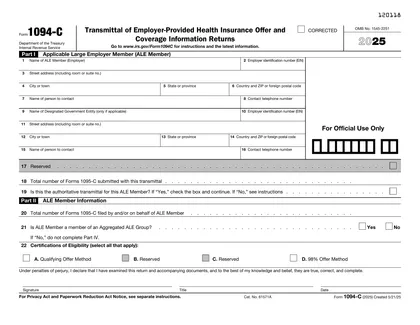
Form 1094-C is an important document used by large employers to report information about their health insurance coverage to the IRS. It shows how many full-time employees you have and whether they were offered health insurance. This form helps the IRS enforce the Affordable Care Act and ensures that employers provide necessary health coverage. Filing it accurately is vital to avoid penalties and to keep your business compliant with federal health care laws.
What is Form 1094-C used for?
Form 1094-C is used by employers to report information regarding health coverage offered to employees. Here’s what it helps with:
- to provide details about employer health insurance.
- to summarize coverage offered to full-time employees.
- to facilitate compliance with the Affordable Care Act.
How to fill out Form 1094-C?
Open the 1094-C form in the PDF editor.
Fill out Part I with your employer information, including name and EIN.
Complete Part II, providing details about the number of full-time employees.
Ensure that all sections are accurate and complete.
Review the form for any errors or missing information.
Download the filled form.
Submit the form to the IRS by the deadline, typically via mail.
Who is required to fill out Form 1094-C?
Employers with 50+ employees must complete Form 1094-C for health coverage reporting.
Insurance providers and the IRS use the form to verify compliance and health coverage details.
When is Form 1094-C not required?
If you have fewer than 50 full-time employees, you don't need to file Form 1094-C. Small employers are exempt from this requirement, as the Affordable Care Act (ACA) imposes filing obligations mainly on larger employers.
Additionally, if your organization is not an Applicable Large Employer (ALE) or if you do not offer health coverage, you also won't need to file this form. Always check with the IRS for the latest guidelines.
When is Form 1094 C due?
The deadline for Form 1094-C is generally February 28 if you are filing by paper, or March 31 if you are filing electronically. This form is part of the Affordable Care Act requirements.
It's important to keep track of these dates to avoid penalties. Make sure to check the IRS website for any updates or changes to deadlines each tax year.
How to get a blank Form 1094-C?
To get a blank Form 1094-C, simply visit our platform. The form is pre-loaded in our editor, ready for you to fill out. Once you complete the necessary fields, you can download it for your records.
How to sign Form 1094-C online?
To sign Form 1094-C online using CookPDF, first, open the platform and click on "Fill Form." Load the blank version of Form 1094-C in the PDF editor. Fill in all required fields carefully.
Once you have completed the form, create a simple electronic signature by following the prompts. After signing, click "Done" to download your completed form. Always consult official sources for specific signature requirements.
Where to file Form 1094-C?
Form 1094-C can be filed online through the IRS e-file system or by mailing a paper copy to the IRS. Choose the method that best suits your needs.
If filing by mail, ensure you send it to the correct address as specified by the IRS. Check their website for the latest filing details and deadlines.
Frequently asked questions
Fill out Form 1094-C Online in 2026
Download Form